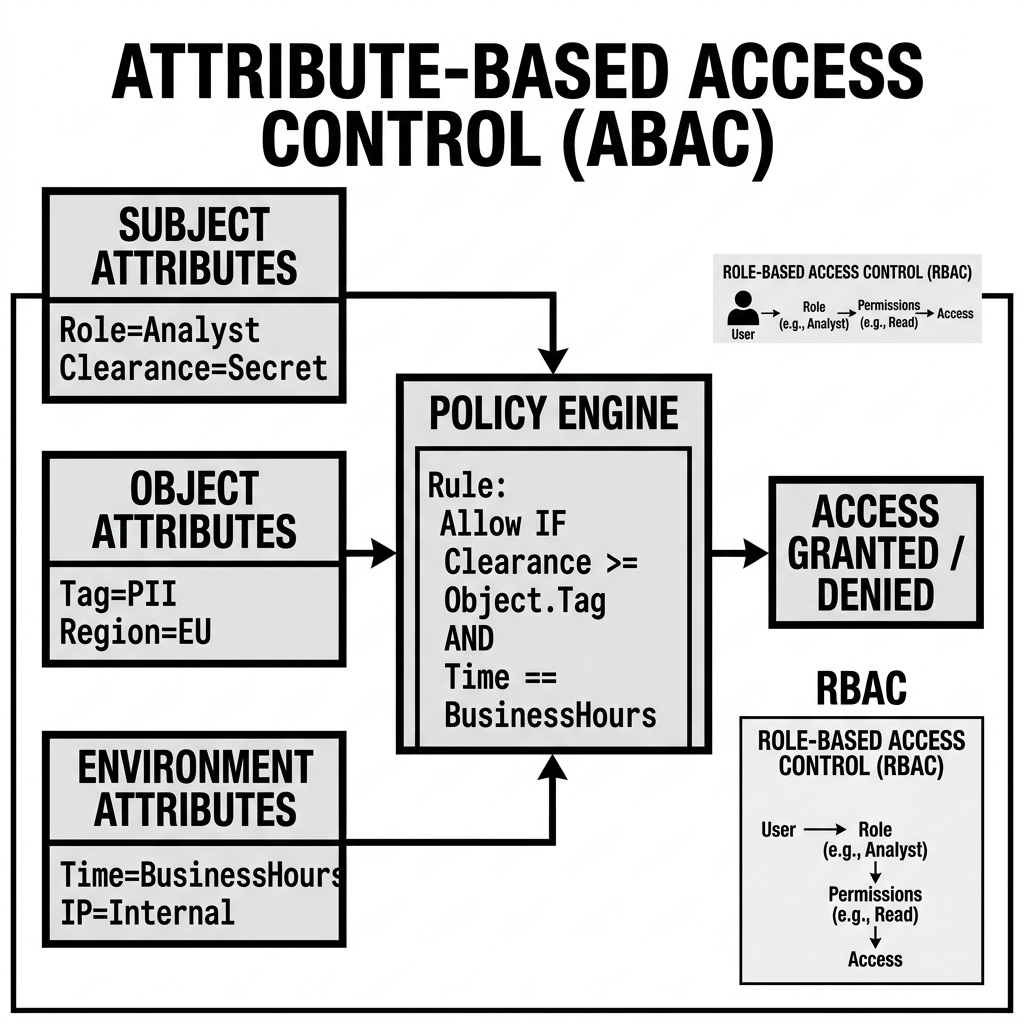
Attribute-Based Access Control (ABAC)
Attribute-Based Access Control is an access management model that makes authorization decisions based on the attributes of the subject (who is requesting access), the resource (what is being accessed), the environment (when and how the request is made), and the action (what operation is being requested) — rather than on membership in a statically defined role. ABAC extends and generalizes the RBAC model: where RBAC asks “does this user have this role, which grants this privilege?”, ABAC asks “do the attributes of this request satisfy this policy?”
The practical difference is expressiveness and dynamism. RBAC is powerful but static: a role grants a fixed set of privileges to a fixed set of resources, and changing the policy requires updating role definitions or assignments. ABAC enables policies like “allow access to any table tagged data_classification=internal for any user whose department attribute matches the table’s owning_department tag, except when the request originates from outside the corporate network” — policies that would require an exponential number of RBAC roles to express statically, but can be expressed as a single ABAC policy rule.
In the data lakehouse context, ABAC is most valuable for governing large, heterogeneous table estates where the access requirements are too dynamic and context-dependent for static role definitions to manage efficiently — particularly for data classification-driven governance, regulatory compliance (GDPR, CCPA, HIPAA), and data mesh domain ownership models.
The Attribute Categories
ABAC systems evaluate policies based on four categories of attributes:
Subject Attributes
Attributes of the entity requesting access:
- Identity: User ID, service account name, email address.
- Group memberships: Which IAM groups, LDAP groups, or IdP groups the user belongs to.
- Department: The user’s organizational unit (Marketing, Finance, Engineering).
- Job title / function: Engineer, Analyst, Data Scientist, Compliance Officer.
- Clearance level: A custom attribute indicating the user’s data classification access level (Public, Internal, Confidential, Restricted).
- Employment status: Full-time employee vs. contractor vs. external partner.
- Authentication strength: Whether the user authenticated with MFA, certificate-based auth, or basic password.
These attributes are typically sourced from the identity provider (Okta, Azure AD, AWS IAM Identity Center) and injected into the JWT or SAML token that the catalog receives when the user authenticates.
Resource Attributes
Attributes of the data resource being accessed:
- Data classification tag: A label indicating the sensitivity of the data (
data_classification=public,data_classification=internal,data_classification=confidential,data_classification=restricted). - PII flag: A boolean indicating whether the table or column contains Personal Identifiable Information.
- Owning domain / department: Which business domain owns and is responsible for the data.
- Data region: Where the data is geographically stored (EU, US, APAC) — relevant for data residency regulations.
- Compliance scope: Whether the table is in-scope for SOX, HIPAA, GDPR, or PCI-DSS compliance.
- Quality certification: Whether the table has passed data quality certification (relevant for governed gold-layer access).
Resource attributes are typically applied as metadata tags attached to tables, schemas, or catalogs in the catalog service. Unity Catalog’s APPLY TAG permission allows authorized administrators to tag tables; Polaris supports namespace and table properties for attribute storage.
Environment Attributes
Contextual attributes of the access request itself:
- Request time: Time of day, day of week (some regulations require restricting data access outside business hours).
- Client IP address / network: Whether the request originates from the corporate VPN, a specific cloud VPC, or the public internet.
- Authentication method: MFA-authenticated vs. password-only.
- Access frequency: Rate limiting / anomaly detection (is this user requesting unusual volumes of data?).
- Compute engine type: Is the request from a Spark cluster, a BI tool, an AI agent?
Action Attributes
The specific operation being requested:
- Read (
SELECT), write (INSERT,UPDATE,DELETE), DDL (CREATE,DROP,ALTER), administrative (MANAGE_RBAC). - Bulk export vs. record-by-record access (for detecting potential data exfiltration).
ABAC Policy Language
ABAC policies are expressed as conditional rules that evaluate combinations of the four attribute categories. A policy engine evaluates these rules at request time to determine whether access should be granted or denied.
Example Policy Rules
Data classification policy:
IF subject.clearance_level >= resource.data_classification_level
   AND action IN (SELECT, READ_VOLUME)
THEN ALLOW
ELSE DENY
This single rule replaces thousands of RBAC grants: every user with clearance_level=confidential automatically has read access to all tables tagged data_classification=confidential and below, regardless of which specific tables they are or when new tables are created.
GDPR data residency policy:
IF resource.data_region = 'EU'
   AND (subject.location != 'EU' OR environment.vpn_connected = FALSE)
   AND resource.gdpr_scope = TRUE
THEN DENY
This prevents EU-resident personal data from being accessed outside the EU network, regardless of the user’s role.
Data mesh ownership policy:
IF subject.department = resource.owning_department
THEN ALLOW WITH privileges=[SELECT, MODIFY, CREATE]
ELSE IF subject.role IN (cross_domain_analysts)
THEN ALLOW WITH privileges=[SELECT]
ELSE DENY
This policy automatically grants full access to a domain’s tables to anyone in that department, and read-only access to cross-domain analysts, without maintaining explicit role-to-table grants for every table in every domain.
Time-bounded regulatory access:
IF resource.compliance_scope = 'SOX'
   AND subject.function != 'sox_auditor'
   AND environment.request_time NOT IN business_hours_window
THEN DENY
ABAC in Lakehouse Catalog Implementations
Unity Catalog: Tags and Row Filters as ABAC Mechanisms
Unity Catalog implements ABAC capabilities through two mechanisms:
System tags: Metadata labels attached to catalogs, schemas, tables, and columns using the ALTER TABLE ... SET TAGS (...) syntax. Tags are key-value pairs that can be used in policy evaluation and in the data discovery UI.
Row Filters: SQL functions that implement dynamic, attribute-based row-level filtering. A row filter is attached to a table and evaluated at query time based on the current session’s user attributes:
CREATE FUNCTION finance.row_filters.region_filter(region_col STRING)
  RETURN region_col = (SELECT region FROM dim_users WHERE user = current_user());

ALTER TABLE finance.orders
  SET ROW FILTER finance.row_filters.region_filter ON (sale_region);
This row filter ensures each user sees only orders from their own region — a classic ABAC pattern where the user attribute (region from the dim_users table) determines which rows of the resource (the orders table) are accessible.
Column Masks: SQL functions that transform column values based on user attributes:
CREATE FUNCTION security.masks.ssn_mask(ssn STRING)
  RETURN CASE WHEN is_member('pii_authorized')
              THEN ssn
              ELSE REGEXP_REPLACE(ssn, '[0-9]', '*') END;

ALTER TABLE hr.employees
  SET MASK security.masks.ssn_mask ON COLUMN ssn;
Users in the pii_authorized group see the full SSN; all other users see a masked version.
Apache Polaris: Property-Based Resource Attributes
Polaris supports attaching key-value properties to namespaces and tables as resource attribute stores. These properties can be evaluated in Polaris policy rules or read by external policy engines (Open Policy Agent) to make ABAC-style authorization decisions.
Polaris’s roadmap includes deeper native ABAC support through property-based privilege conditions, though as of early 2026, complex ABAC logic in Polaris typically requires integration with an external policy engine (OPA, Cedar).
AWS Lake Formation: Tag-Based Access Control (TBAC)
AWS Lake Formation provides LF-Tags — a form of ABAC specifically designed for lakehouse governance. LF-Tags are key-value attributes attached to Glue Data Catalog objects (databases, tables, columns). Lake Formation permissions can be granted based on LF-Tag attribute conditions rather than on specific named resources:
GRANT SELECT ON ALL TABLES WITH LF-TAG (classification=internal)
TO IAM ROLE data_engineers;
This grants the data_engineers IAM role read access to every Glue table tagged classification=internal, without explicitly listing those tables. As new tables are tagged with classification=internal, they automatically become accessible to data_engineers without any new permission grants.
LF-Tags are the most mature ABAC implementation in the AWS ecosystem, making Lake Formation TBAC the recommended approach for organizations with large AWS Glue table estates that need dynamic, classification-driven access governance.
Open Policy Agent (OPA) Integration
Open Policy Agent is a general-purpose, open-source policy engine that can evaluate ABAC policies (written in the Rego policy language) as an external authorization service. Several catalog implementations support OPA integration as an authorization plugin:
# Rego policy: allow access if subject clearance >= resource classification
allow {
  input.action == "read"
  clearance_level[input.subject.clearance] >= classification_level[input.resource.classification]
}

clearance_level := {"public": 0, "internal": 1, "confidential": 2, "restricted": 3}
classification_level := {"public": 0, "internal": 1, "confidential": 2, "restricted": 3}
OPA evaluates this policy at query time, receiving the subject attributes (from the identity token), resource attributes (from the catalog’s table properties), environment attributes (from the request context), and action (from the API operation), and returning an ALLOW or DENY decision.
ABAC vs. RBAC: When to Use Each
| Dimension | RBAC | ABAC |
|---|---|---|
| Policy complexity | Fixed, enumerable | Dynamic, conditional |
| Administration overhead | Higher (manage role assignments) | Lower (manage tag assignments) |
| Expressiveness | Limited to role-based conditions | Arbitrarily complex conditions |
| Implementation maturity | Mature, universally supported | Less mature, requires policy engine |
| Auditability | Simple (list roles for a user) | Complex (trace policy evaluation) |
| Best for | Stable, function-based access patterns | Dynamic, attribute-driven classification policies |
In practice, enterprise lakehouse governance combines both: RBAC for stable function-based access (data engineers write to silver tables; analysts read gold tables) and ABAC for dynamic classification-based governance (anyone with clearance=confidential can access classification=confidential tables; EU-resident data is restricted to EU networks). The combination provides the administrative simplicity of RBAC where access patterns are predictable and the policy expressiveness of ABAC where they are not.
Conclusion
Attribute-Based Access Control brings the expressiveness and dynamism that RBAC alone cannot provide to lakehouse data governance. By making authorization decisions based on the rich attribute context of the subject, resource, environment, and action — rather than on static role membership — ABAC enables classification-driven governance at the scale of modern data estates, regulatory compliance enforcement that adapts automatically as data is classified, and data mesh ownership models where domain boundaries are enforced through metadata attributes rather than explicit per-table grants. As data classification tagging, LF-Tag governance, and OPA integration become standard components of enterprise lakehouse deployments, ABAC is becoming the policy model of choice for organizations with complex, dynamic, or regulation-driven access requirements that exceed what RBAC alone can express.
Visual Architecture