Bloom Filters
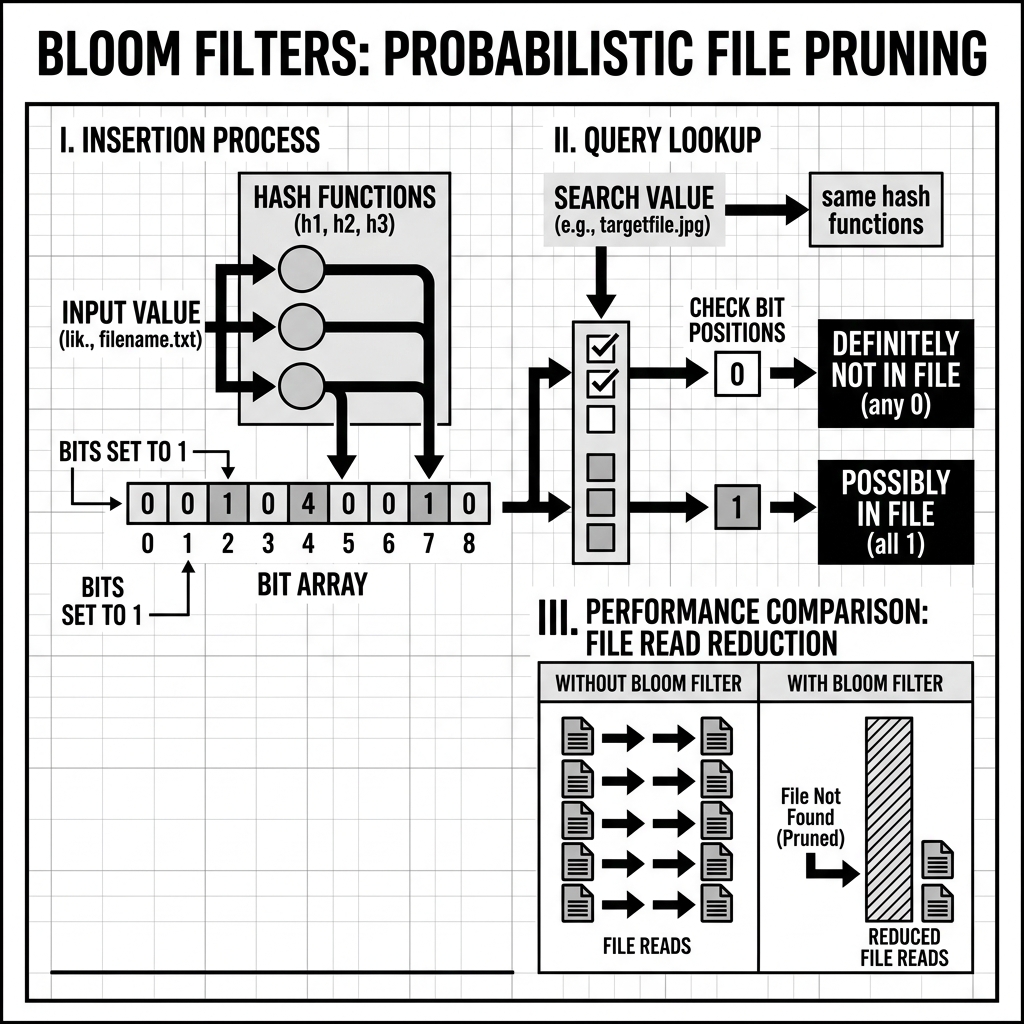
A Bloom Filter is a space-efficient probabilistic data structure invented by Burton Howard Bloom in 1970. It answers one question and answers it with absolute asymmetric precision: “Is element X possibly in this set, or is it definitely not in this set?” The answer “definitely not” is always correct — there are zero false negatives. The answer “possibly yes” is correct most of the time but carries a configurable probability of being wrong — a false positive.
In data lakehouse environments, this asymmetric correctness profile is enormously valuable. For query optimization, the ability to definitively answer “this file cannot possibly contain rows where user_id = 12345” eliminates the need to open, decompress, decode, and scan that file. A system that can answer “definitely not” for 90% of files in a large table reduces the IO cost of a point-lookup query by 90%. Bloom Filters are the primary mechanism that enables this level of aggressive data skipping for high-cardinality equality predicates — the category of query filter where min-max statistics, the more common skipping mechanism, provide virtually no benefit.
The Mathematical Mechanics
A Bloom Filter consists of two components:
1. A Bit Array: A vector of M bits, all initialized to 0.
2. K Independent Hash Functions: Each hash function maps an arbitrary input value to a position within the bit array (0 to M-1). The hash functions should be fast, independent of each other, and uniformly distributed across the bit array.
Insertion
When an element is added to a Bloom Filter, it is passed through all K hash functions. Each hash function produces a position in the bit array. The bits at all K positions are set to 1.
For example, with K=3 hash functions and element “user_5000”:
- Hash function 1 produces position 42 → set bit[42] = 1
- Hash function 2 produces position 187 → set bit[187] = 1
- Hash function 3 produces position 903 → set bit[903] = 1
The element “user_5000” is now “represented” in the Bloom Filter by these three set bits.
Lookup (Query)
When checking whether an element is in the set, the same K hash functions are applied to the element, producing K positions. The filter then checks:
-
If any of the K positions has a 0 bit: the element is definitely not in the set. It is impossible for an element to have been inserted without setting all K of its positions to 1. A zero bit means those positions were never activated by this element. Return “definitely not.”
-
If all of the K positions have 1 bits: the element is probably in the set. All K positions could have been set to 1 by this element’s prior insertion, OR they could have been set to 1 by other elements’ insertions that happened to produce the same K positions through different hash function collisions. Return “probably yes” (with false positive probability p).
Deletion is Impossible
A fundamental limitation of the standard Bloom Filter is that elements cannot be deleted. Setting a bit to 0 when removing element A would potentially corrupt the representation of element B that happens to share one of element A’s K positions. The bit array represents the union of all ever-inserted elements’ hash positions — there is no way to reverse an individual element’s contribution without knowing which other elements share its positions.
This limitation is acceptable in data lakehouse contexts because Bloom Filters are attached to immutable Parquet files. When a file is compacted or rewritten, a new Bloom Filter is generated for the new file from scratch. Deletions at the table level (via Delete Files) are handled by other mechanisms; the Bloom Filter for the original data file simply represents the original values and is discarded when the file is garbage collected.
The False Positive Rate
The false positive probability p is a function of three parameters:
- M: the number of bits in the bit array
- N: the number of elements inserted
- K: the number of hash functions
The optimal false positive rate is achieved when K = (M/N) × ln(2) ≈ 0.693 × (M/N). For a given target false positive rate p, the required bit array size is M = -N × ln(p) / (ln(2))².
In practical Parquet implementations, Bloom Filters are configured to achieve a false positive rate of approximately 1% (1 in 100 lookups that return “probably yes” will be wrong). This requires approximately 9.6 bits per element. For a Parquet row group containing 1 million rows and a Bloom Filter on a single column, the Bloom Filter structure occupies approximately 1.2 megabytes — negligible compared to the tens or hundreds of megabytes of actual column data in the row group.
The Critical Use Case: High-Cardinality Equality Predicates
To understand why Bloom Filters are so important, it is necessary to understand the specific gap they fill in the existing data skipping mechanism landscape.
Why Min-Max Statistics Fail for Point Lookups
Min-max statistics (the per-column minimum and maximum values stored in Parquet row group footers and Iceberg Manifest Files) work by range exclusion. If a query predicate is WHERE sale_date = '2026-05-18', and a file’s sale_date min is 2026-05-01 and max is 2026-05-31, the file cannot be skipped — the date falls within the min-max range, so the file might contain matching rows.
For date columns, partition pruning (if the table is partitioned by date) handles this efficiently — files from the wrong partition are skipped entirely. But what about a predicate like WHERE user_id = 7,842,913?
In a large table with 500 million users, the user_id column in every file (unless the table is Z-ordered by user_id) will have min-max statistics spanning the full range from user ID 1 to user ID 500 million. Every single file’s min-max range includes user ID 7,842,913. The query engine cannot skip any file based on min-max statistics. It must open and scan every file in the relevant partition (or the entire table if unpartitioned) to find the rows for that specific user. For a petabyte-scale table with billions of files, this is catastrophic for query performance.
The Bloom Filter Solution
A Bloom Filter embedded in each Parquet row group for the user_id column contains the exact set of user IDs present in that row group. For a query with WHERE user_id = 7,842,913, the query engine:
- Opens the Parquet file footer (a few kilobytes of metadata read).
- Checks the Bloom Filter for
user_idvalue 7,842,913. - If the Bloom Filter returns “definitely not”: skip this row group entirely. The user does not exist here.
- If the Bloom Filter returns “probably yes”: proceed to read, decompress, and scan the row group for the matching rows.
In a typical large table, a specific user_id will appear in perhaps 0.001% of all row groups. With a well-populated Bloom Filter and 1% false positive rate, the query engine will read at most 1% of all row groups in a false positive scenario plus the 0.001% that actually contain the user — a total scan of roughly 1.001% of the table’s row groups instead of 100%. This is a 100x reduction in IO for a point-lookup query.
Bloom Filters in Parquet
Bloom Filter support was added to the Apache Parquet specification in version 2.7. When writing Parquet files, the writer engine can be configured to generate Bloom Filters for specified columns.
Parquet Bloom Filter Structure
In Parquet, the Bloom Filter for a column is stored in the row group’s footer section, adjacent to the column chunk metadata. The physical layout is:
- A 4-byte header specifying the Bloom Filter’s algorithm and the number of filter bytes.
- The bit array (the filter itself).
- An optional hash function seed for reproducibility.
The Parquet specification uses the Split Block Bloom Filter algorithm, which divides the bit array into 32-byte blocks and uses 8 hash positions per element, all within the same block. This block-aligned structure takes advantage of cache line alignment on modern CPUs, making filter lookups extremely fast (a single cache line read for each element lookup).
Enabling Bloom Filters in Apache Spark
In Spark with Parquet output:
df.write \
  .option("parquet.bloom.filter.enabled", "true") \
  .option("parquet.bloom.filter.enabled#user_id", "true") \
  .option("parquet.bloom.filter.expected.ndv#user_id", "1000000") \
  .option("parquet.bloom.filter.fpp#user_id", "0.01") \
  .parquet("s3://bucket/table/")
The expected.ndv (number of distinct values) and fpp (false positive probability) parameters control the bit array size, ensuring the filter is properly sized for the actual data cardinality.
Bloom Filter Pruning in Query Engines
For the Bloom Filter to provide data skipping benefits, the query engine reading the Parquet file must implement Bloom Filter pruning. Trino, Spark SQL, and Presto all implement Parquet Bloom Filter pruning: when planning a query with equality predicates, they read the Parquet footer’s Bloom Filter for the predicate column and check each row group’s filter before deciding whether to read that row group’s data.
The planner must also recognize which query predicates are amenable to Bloom Filter pruning. Equality predicates (WHERE user_id = 12345, WHERE email = 'alice@example.com') are directly applicable. Range predicates (WHERE user_id BETWEEN 1000 AND 2000) and inequality predicates (WHERE user_id != 12345) cannot be pruned by Bloom Filters — these require min-max statistics or other mechanisms.
Bloom Filters in Apache Iceberg
Iceberg extends the Bloom Filter concept beyond the Parquet row group level to the table-wide metadata level, enabling even more aggressive file-level pruning before any data file is opened.
Puffin Files: Table-Level Index Storage
Apache Iceberg introduced the Puffin file format as a container for storing table-level index structures, including Bloom Filters for specific columns. A Puffin file is an Iceberg-specific binary format (not Parquet) designed to hold arbitrary metadata “blobs” — indexed by their type and target column — alongside the main table metadata.
When a Bloom Filter index is built for a column in an Iceberg table, a Puffin file is written containing one Bloom Filter per data file in the table. Each Bloom Filter represents the set of values present in the entire data file (not just a single row group). The Puffin file is referenced from the Iceberg Snapshot metadata.
File-Level Pruning Before Data Read
The power of Iceberg’s Puffin-based Bloom Filters is that they enable pruning at the planning stage — before the query engine ever opens a data file.
When a query planner processes a query with WHERE user_id = 7,842,913:
- It reads the Puffin file (small, cached by the query engine).
- For each active data file in the table, it checks the Bloom Filter for
user_id = 7,842,913. - Files that return “definitely not” are eliminated from the scan plan entirely — they are not opened, not listed in the Parquet reader’s queue, not subject to any further IO.
- Only files that return “probably yes” (the small fraction that either contain the user or produce a false positive) are opened and scanned.
This is more efficient than Parquet-level row group pruning because the pruning happens at query planning time (before any data IO) rather than during data reading. The Puffin file is typically small enough to be kept in the query engine’s metadata cache, meaning subsequent queries on the same table pay only the in-memory lookup cost for filter consultation.
Iceberg Bloom Filter Maintenance
Iceberg Bloom Filter indexes must be maintained as the table’s data evolves. When new data files are compacted or written, their Bloom Filters must be computed and added to the Puffin file index. When old data files are expired (via expireSnapshots), their Bloom Filter entries must be removed from the index.
This maintenance is typically performed as part of the standard Iceberg table maintenance procedures, either embedded in the compaction job or as a dedicated rewriteDataFiles step with statistics collection enabled.
Selecting Columns for Bloom Filter Indexing
Not all columns benefit equally from Bloom Filter indexing. The decision to add a Bloom Filter for a column should be based on three criteria:
High Cardinality: Bloom Filters are designed for high-cardinality columns where min-max statistics are ineffective. If a column has only 10 distinct values, a simple dictionary (or even a literal value list in the manifest statistics) is more efficient. Bloom Filters pay for themselves when columns have thousands or millions of distinct values.
Frequent Equality Predicate Usage: Bloom Filters help only with equality predicates. If a column is primarily filtered with range predicates (BETWEEN, >, <), the Bloom Filter provides no skipping benefit and only adds storage and write overhead.
High Selectivity at the File Level: If virtually every data file in the table contains every possible value of a column (e.g., a status column with values that are uniformly distributed across all files), the Bloom Filter for that column will return “probably yes” for essentially every file regardless of the query value. The benefit is minimal.
Ideal Bloom Filter candidates: user_id, order_id, product_sku, transaction_id, email_address, device_fingerprint — high-cardinality identity or foreign key columns used frequently in point-lookup equality filters.
Conclusion
Bloom Filters fill a specific and critical gap in the data skipping arsenal of the modern data lakehouse. Where min-max statistics provide excellent skipping for range predicates on sorted or partitioned data, they provide virtually no skipping for high-cardinality equality predicates — the exact workload that dominates user-facing operational analytics, GDPR right-to-deletion lookups, and entity-centric data science workflows. By embedding probabilistic membership tests with a configurable false positive rate (typically 1%) at both the Parquet row group level and the Iceberg data file level (via Puffin files), Bloom Filters enable query engines to eliminate 90–99% of irrelevant files and row groups from point-lookup scans with minimal storage and write overhead. Understanding when to apply them, what columns to index, and how they interact with min-max statistics, partitioning, and Z-Ordering is essential for data engineers tasked with achieving sub-second query performance on petabyte-scale analytical tables.
Visual Architecture