Catalog Migration
Catalog Migration is the process of transitioning Apache Iceberg tables from one catalog implementation to another — from Hive Metastore to a REST Catalog, from AWS Glue to Apache Polaris, from a JDBC Catalog to Project Nessie, or from any other source catalog to any target catalog — while preserving the tables’ data, metadata, snapshot history, and schema definitions. It is an operational procedure that most lakehouse deployments will encounter as they mature: starting with a simpler catalog (HMS, JDBC, Hadoop) for initial deployment and migrating to a more capable one (REST Catalog, Polaris, Nessie) as governance, performance, and interoperability requirements evolve.
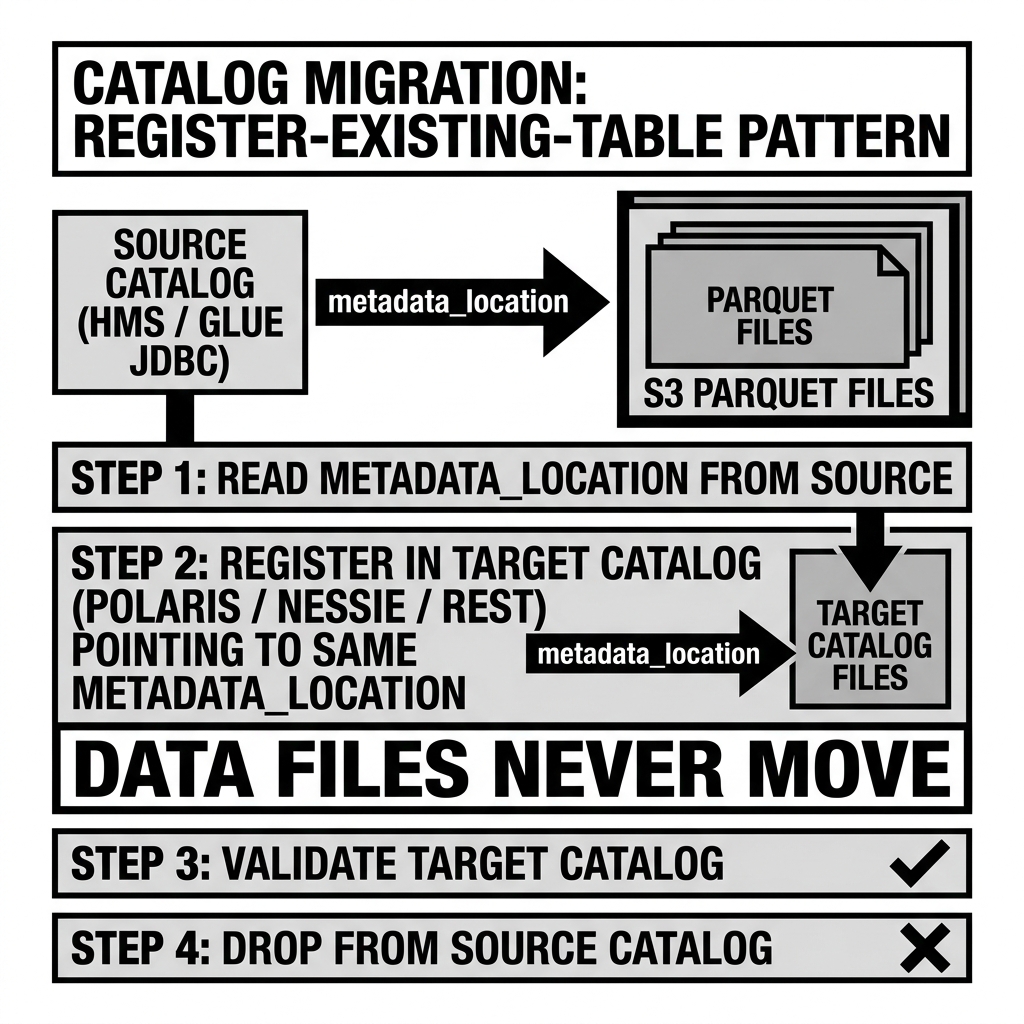
Iceberg’s architecture makes catalog migration fundamentally simpler than format-to-format data migration: because all of a table’s data, metadata, and history lives in immutable files on object storage — and the catalog stores only a pointer to the current metadata file — catalog migration is a metadata operation, not a data movement operation. The data files themselves never move; only the catalog’s record of where the metadata file lives needs to be updated in the target catalog.
Why Catalog Migration Happens
The Maturity Progression
Most lakehouse deployments follow a predictable catalog maturity progression:
Stage 1 — Initial deployment: Start with the simplest available catalog — Hadoop Catalog for local development, JDBC Catalog for a small self-hosted deployment, or Hive Metastore for an existing Hadoop cluster. The goal is to get Iceberg working quickly without significant infrastructure investment.
Stage 2 — Scale: As data volumes grow, team size expands, and multi-engine access requirements emerge, the initial catalog’s limitations become pain points:
- The Hadoop Catalog is unsafe for concurrent writers on S3.
- The JDBC Catalog lacks credential vending and multi-table atomicity.
- HMS lacks the REST Catalog API required for some engine integrations.
Stage 3 — Enterprise governance: As regulatory requirements, multi-team collaboration, and AI agent access requirements emerge, full REST Catalog capabilities (RBAC, credential vending, audit logging, multi-table transactions) become requirements.
Stage 4 — Platform consolidation: Organizations with multiple catalogs (Glue for some tables, HMS for others, Nessie for experimental) consolidate to a single authoritative catalog (Polaris, Unity Catalog) for unified governance.
Specific Migration Scenarios
| Source Catalog | Target Catalog | Primary Driver |
|---|---|---|
| Hadoop/Filesystem | JDBC Catalog | Need concurrent writers on S3 |
| JDBC Catalog | HMS | Need Hive/Spark HMS compatibility |
| HMS | REST Catalog (Polaris, Nessie) | Need REST API, credential vending, RBAC |
| AWS Glue | Apache Polaris | Need multi-cloud, vendor neutrality |
| Multiple catalogs | Single Polaris | Governance consolidation |
| Nessie (Arctic) | Polaris | Dremio product evolution |
The Core Migration Mechanics
The Register-Existing-Table Approach
Iceberg’s “register existing table” operation is the foundation of all catalog-to-catalog migrations. Because a table’s complete definition lives in its metadata.json file, registering a table in a new catalog requires only providing the new catalog with the path to the existing metadata.json — no data movement, no schema re-import, no snapshot re-creation.
How it works:
-
Find the current metadata location: In the source catalog, retrieve the current
metadata_locationfor the table. This is the path to themetadata.jsonfile on S3 (or GCS, ADLS).For HMS:
DESCRIBE TABLE EXTENDED source_db.orders;
-- Look for: Location | s3://bucket/warehouse/orders/metadata/v25.metadata.json
For Glue (using boto3):
import boto3 glue = boto3.client('glue') table = glue.get_table(DatabaseName='analytics', Name='orders') metadata_location = table['Table']['Parameters']['metadata_location'] -
Register the table in the target catalog: Call the target catalog’s register table API with the existing
metadata_location.For Iceberg Spark (registering in a new catalog):
spark.sql(f"""
  CALL target_catalog.system.register_table(
    identifier => 'analytics.orders',
    metadata_file => 's3://bucket/warehouse/orders/metadata/v25.metadata.json'
  )
""")
For Polaris REST API:
POST /v1/analytics/namespaces/orders_namespace/register { "name": "orders", "metadata-location": "s3://bucket/warehouse/orders/metadata/v25.metadata.json" } -
Verify the registration: Confirm that the new catalog correctly reads the table’s current state.
-- Using target catalog SELECT COUNT(*) FROM target_catalog.analytics.orders; DESCRIBE TABLE target_catalog.analytics.orders; -
Deprecate the source catalog registration: After verifying the target catalog works correctly, drop the table from the source catalog. Dropping the table from the catalog does NOT delete the data or metadata files — it only removes the catalog’s pointer to the table.
-- Drop from source catalog (data files are NOT deleted)
DROP TABLE IF EXISTS source_catalog.analytics.orders;
The Snapshot-Based Migration Approach
For migrations that require more than just re-registering the existing table (e.g., migrating from a legacy Hive table to an Iceberg table in a new catalog, or migrating from Delta Lake to Iceberg), the snapshot-based approach applies:
- Create the target table: Create a new Iceberg table in the target catalog with the appropriate schema.
- Copy existing data: Use Spark or another engine to read the source table and write to the target table as a new Iceberg table.
- Validate: Verify row counts, column distributions, and partition structures match.
- Cutover: Switch applications to use the target catalog’s table name.
This approach requires data movement (reading all source data and writing it to a new location) — appropriate when the source is not Iceberg or when the target storage location is different from the source.
Migration Tooling
PyIceberg Catalog Migration
PyIceberg provides a migrate_table utility for programmatic catalog-to-catalog table migration:
from pyiceberg.catalog import load_catalog

source_catalog = load_catalog("source", **{
    "uri": "thrift://hms-host:9083",
    "warehouse": "s3://source-bucket/warehouse",
})

target_catalog = load_catalog("target", **{
    "uri": "https://polaris.example.com/",
    "credential": "client_id:client_secret",
    "warehouse": "s3://source-bucket/warehouse",  # Same warehouse — no data movement
})

# Get the source table's metadata location
source_table = source_catalog.load_table("analytics.orders")
metadata_location = source_table.metadata_location

# Register in target catalog
target_catalog.register_table(
    identifier=("analytics", "orders"),
    metadata_location=metadata_location,
)
For bulk migration of many tables from one catalog to another, this can be wrapped in a loop:
for namespace, table_name in source_catalog.list_tables("analytics"):
    source_table = source_catalog.load_table((namespace, table_name))
    target_catalog.register_table(
        identifier=(namespace, table_name),
        metadata_location=source_table.metadata_location,
    )
    print(f"Migrated: {namespace}.{table_name}")
Iceberg Migration Actions (Apache Spark)
For migrating non-Iceberg tables (Hive, Delta, Parquet directories) to Iceberg format in a new catalog, Iceberg provides Migration Actions:
Hive Parquet table → Iceberg:
CALL spark_catalog.system.migrate('hive_db.orders');This converts an existing Hive-format partitioned table to Iceberg format in-place (the data files remain in the same locations; Iceberg metadata is generated and registered in the catalog).
External Parquet directory → Iceberg:
CALL spark_catalog.system.add_files(
  table => 'iceberg_catalog.analytics.orders',
  source_table => '`parquet`.`s3://bucket/raw/orders/`'
);
This adds existing Parquet files to a new Iceberg table without copying the data.
The Cutover Strategy: Blue-Green Catalog Migration
For production catalog migrations where downtime is unacceptable, a blue-green cutover strategy manages the transition:
Phase 1 — Parallel registration: Register all tables in the target catalog while the source catalog continues to serve active queries. Both catalogs point to the same underlying data files on S3. The target catalog is “dark” (registered but not serving traffic).
Phase 2 — Shadow testing: Run application queries against both catalogs and compare results. Verify that the target catalog returns identical query results to the source catalog for all query patterns.
Phase 3 — Traffic shift: Update application catalog configurations (compute engine configs, BI tool connections, API credentials) to use the target catalog instead of the source. Applications that need downtime-free migration can be updated one at a time (incremental traffic shift).
Phase 4 — Source decommission: After all applications have been validated on the target catalog and a stability window has passed, drop the table registrations from the source catalog and decommission the source catalog service.
The key safety property of this approach: because both catalogs point to the same S3 metadata files and data files, no data can be lost during the migration. If the target catalog proves problematic, reverting to the source catalog is as simple as switching the application configurations back.
Managing Concurrent Writes During Migration
The most complex scenario in catalog migration is managing tables that are actively written during the migration period. If a write job uses the source catalog to commit a new snapshot during the migration, the source catalog’s metadata pointer advances. But the target catalog still points to the old metadata file — it doesn’t know about the new snapshot.
Solutions:
Option A — Maintenance window: Schedule a maintenance window during which all writes to the migrated tables are paused. Perform the migration during the window. Resume writes using the target catalog after migration completes. This is the safest approach but requires downtime.
Option B — Write cutover with metadata sync: Before the cutover, pause writes temporarily, sync the latest metadata pointer from source to target catalog (re-register with the current metadata_location), then resume writes using the target catalog. This minimizes the write pause to the duration of the re-registration operation (typically seconds).
Option C — Dual-catalog writes (complex): Configure ETL jobs to write to both catalogs simultaneously during the migration period. This ensures both catalogs stay current, but requires significant engineering effort and introduces complexity in reconciling any divergence between the two catalogs’ metadata states.
Option B is the recommended approach for most production migrations: brief pause, re-register, resume.
Post-Migration Validation Checklist
After completing the catalog migration, verify:
- Row counts:
SELECT COUNT(*) FROM target.analytics.ordersmatches the source. - Schema:
DESCRIBE TABLE target.analytics.ordersmatches the source schema (all columns, correct types). - Partition spec: The target table’s partition spec matches the source.
- Snapshot history: Time travel queries against the target table return the expected results for historical snapshots.
- Query performance: Representative query workloads run against the target catalog with comparable or better performance.
- Write operations: A test INSERT commits successfully through the target catalog.
- RBAC: The expected role assignments are in place and access control is working correctly for all user groups.
- Monitoring: Alerting and monitoring systems are updated to track the target catalog’s tables.
Common Migration Pitfalls
Forgetting to update all catalog references: Applications, BI tools, dbt models, Airflow DAGs, Spark job configurations, and Terraform infrastructure definitions may all contain the source catalog’s endpoint URL, credentials, or table references. Missing any one of them causes failures after the cutover.
Insufficient maintenance window: Tables with active streaming writes accumulate new files and new metadata during the migration window. If the maintenance window is too short to handle the accumulated backlog before cutover, the target catalog may start with stale metadata.
Orphan file creation from pre-migration writes: Writes that were in-flight when the source catalog was decommissioned but hadn’t committed may have written data files to S3 that are never registered in the target catalog. Post-migration orphan file cleanup is recommended.
Conclusion
Catalog migration is the operational procedure that enables lakehouse teams to evolve their catalog infrastructure as their governance, scale, and interoperability requirements mature — moving from simpler, lower-overhead catalogs to more capable REST Catalog implementations without disrupting existing data or losing historical table state. Iceberg’s metadata-pointer architecture makes migration inherently non-destructive: tables are re-registered (not re-written), data files are not moved, and snapshot history is fully preserved. The register-existing-table pattern, combined with a blue-green cutover strategy and comprehensive post-migration validation, provides a reliable, low-risk migration path for production lakehouse environments. Understanding catalog migration is a prerequisite for any organization that plans to evolve its lakehouse infrastructure over time — which is to say, every organization building a production data lakehouse.
Visual Architecture