Commit (Iceberg)
In a traditional file-system-based data lake, “committing” data usually just meant finishing the upload of a Parquet file to a directory. The moment the file appeared in the S3 bucket, it was technically live, even if the surrounding metadata hadn’t been updated yet. This lack of a formal commit phase is what led to dirty reads and data corruption.
In Apache Iceberg, writing data to storage and committing data are two completely separate, heavily isolated steps.
The Commit is the definitive, atomic, final action of a transaction. A compute engine can spend hours writing terabytes of Parquet files to an S3 bucket, but until the Commit operation successfully completes against the Iceberg Catalog, that new data is entirely invisible to the rest of the world.
The Three Steps of an Iceberg Commit
A write operation in Iceberg (whether it’s an INSERT, UPDATE, or DELETE) follows a strict sequence:
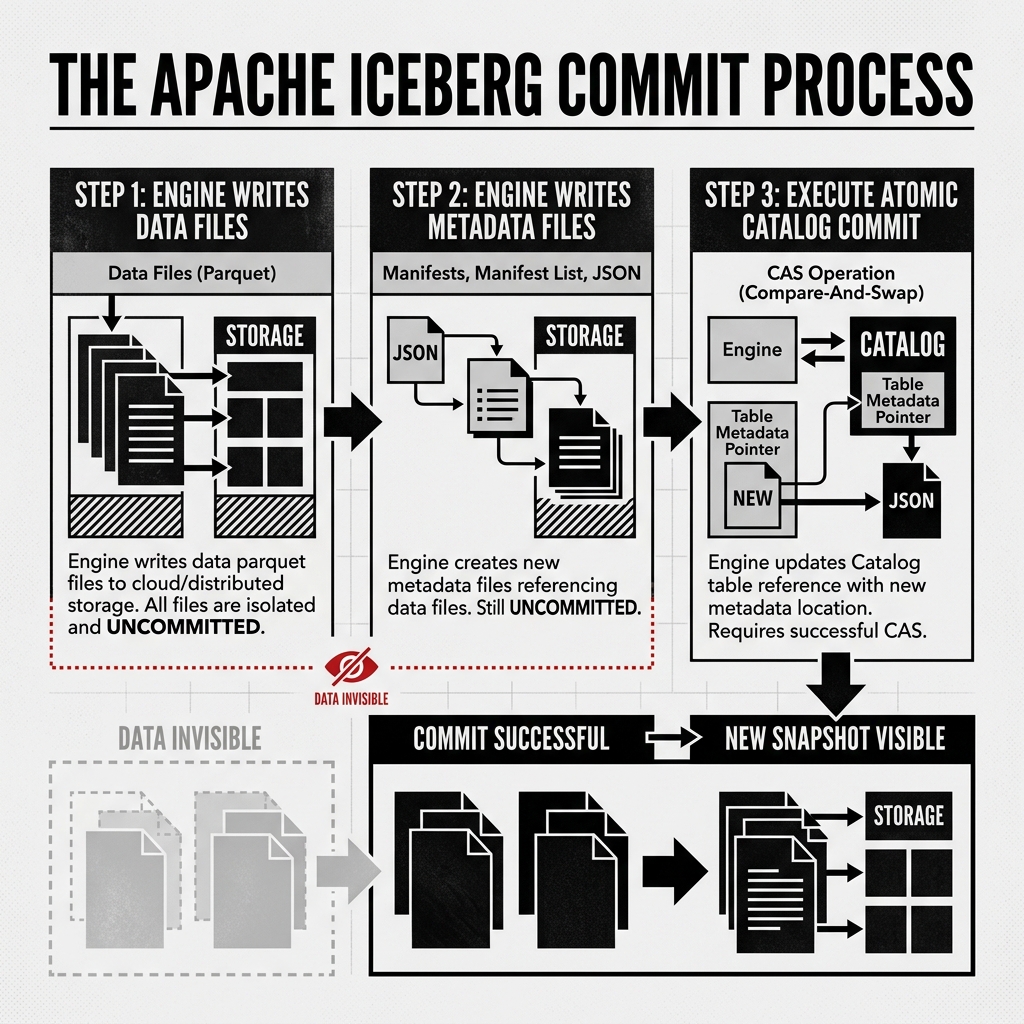
- Write Data Files: The compute engine (like Apache Flink or Spark) processes the incoming data and writes the physical Parquet data files to object storage. These files are orphaned; no metadata points to them yet.
- Write Metadata Files: The engine constructs the new state of the table. It creates new Manifest Files pointing to the new data files. It creates a new Manifest List. Finally, it creates a new JSON metadata file representing the complete new Snapshot of the table. All these files are written to storage. They are still invisible.
- Execute the Commit: The engine reaches out to the Iceberg Catalog. It issues a Compare-and-Swap (CAS) request: “Update the table’s active metadata pointer from the old JSON file to my newly created JSON file.”
If the Catalog accepts the CAS request, the pointer is swapped. In that exact millisecond, the transaction is committed. The next reader to query the table will receive the new JSON file, traverse the new metadata tree, and see the newly written Parquet files.
Diagram 1: The Iceberg Commit Process
Handling Commit Failures
Because Iceberg relies on Optimistic Concurrency Control (OCC), commit failures are an expected part of the system architecture, particularly in highly concurrent environments.
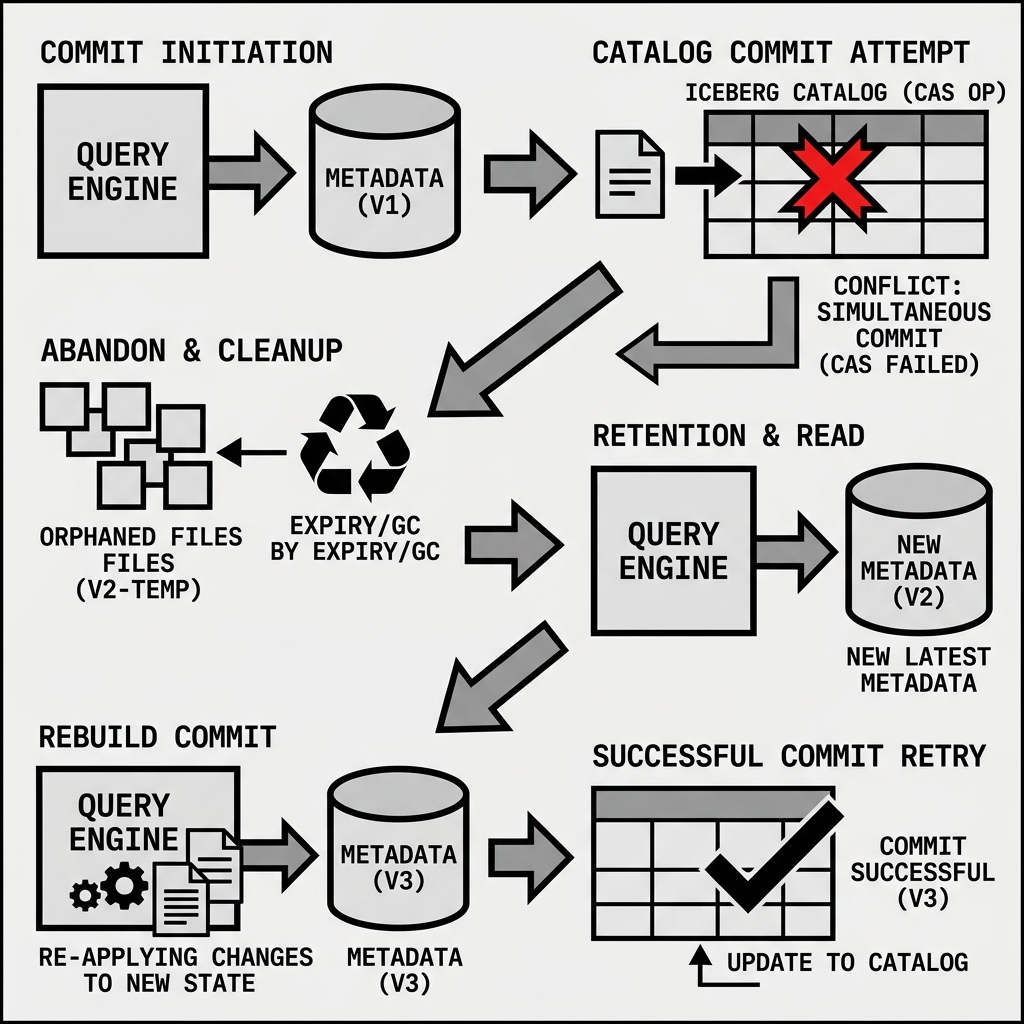
If two engines attempt to commit at the same time, the first one to hit the Catalog succeeds. The second engine’s CAS request will fail because the Catalog’s pointer has already moved forward.
When an Iceberg commit fails, it does not mean the transaction is permanently dead. The Iceberg client libraries contain built-in retry logic.
Upon receiving the rejection from the Catalog, the engine:
- Downloads the new active JSON metadata file that beat it to the punch.
- Evaluates the new state. It checks if the other engine’s changes conflict logically with its own (for example, did the other engine delete the exact same row this engine is trying to update?).
- If there is no logical conflict, the engine simply generates a new Manifest List and a new JSON metadata file based on the updated state.
- It attempts the CAS commit against the Catalog again.
Diagram 2: Commit Rollback and Retry
Orphan Files and Cleanup
What happens to the metadata files (the Manifests and JSON files) that were written to S3 during a failed commit attempt?
Because the catalog rejected the pointer update, those metadata files are never referenced by the active table tree. They become “orphan files.” They take up space in the cloud storage bucket but are completely invisible to the lakehouse.
This is why regular maintenance is critical in an Iceberg lakehouse. Administrators must periodically run a remove_orphan_files procedure. This background job scans the storage bucket, compares all physical files against the files actually referenced in the valid Iceberg metadata trees, and safely deletes any unreferenced files left behind by failed commits or aborted jobs.