Fine-Grained Access Control (FGAC)
Fine-Grained Access Control refers to the collection of data access enforcement mechanisms that operate below the table level — controlling which rows, columns, or individual cells within a table a specific user or role can see or modify. While table-level RBAC determines whether a user can access a table at all, FGAC determines what portion of that table they see when they do.
FGAC is the access governance layer required for compliance with data privacy regulations (GDPR, CCPA, HIPAA), for enforcing multi-tenant data isolation within shared tables, and for enabling “data sharing with controlled disclosure” — letting analysts query tables containing sensitive data while ensuring the sensitive fields or rows are never exposed to unauthorized users.
The Four FGAC Mechanisms
1. Row-Level Security (RLS)
Row-level security restricts which rows of a table a user can read or modify. A row filter condition — typically a SQL boolean expression — is attached to the table and evaluated for each row at query time. Rows for which the filter evaluates to FALSE for the current user are silently excluded from query results, as if they didn’t exist.
Example: A sales table contains orders from all sales regions. Each regional manager should see only orders from their region:
-- Unity Catalog row filter function
CREATE FUNCTION governance.row_filters.sales_region_filter(region STRING)
  RETURN region = (
    SELECT home_region FROM governance.users WHERE user_email = current_user()
  );

ALTER TABLE sales.orders
  SET ROW FILTER governance.row_filters.sales_region_filter ON (sale_region);
After applying this filter, a regional manager for APAC querying SELECT * FROM sales.orders receives only rows where sale_region = 'APAC', regardless of whether they include a WHERE sale_region = 'APAC' clause in their query. The filter is transparent and cannot be bypassed by the user.
Multi-tenancy use case: A single orders table serving multiple tenants can implement row-level security using a tenant_id filter tied to the authenticated user’s tenant attribute. This eliminates the need to maintain separate tables per tenant, while ensuring complete data isolation between tenants.
2. Column-Level Security (Column Masking)
Column masking restricts which columns a user can see with their actual values. A masking function is attached to a specific column and applied at query time, transforming the column’s values based on the querying user’s attributes. Unauthorized users see masked (redacted, pseudonymized, or NULL) values rather than actual data.
Example: An employees table contains a social_security_number column. Only HR administrators and payroll systems should see actual SSN values; all other users should see a masked representation:
-- Unity Catalog column mask function
CREATE FUNCTION governance.masks.ssn_mask(ssn STRING)
  RETURN CASE
    WHEN is_member('hr_administrators') OR is_member('payroll_system')
      THEN ssn
    WHEN is_member('hr_staff')
      THEN CONCAT('XXX-XX-', RIGHT(ssn, 4))
    ELSE NULL
  END;

ALTER TABLE hr.employees
  SET MASK governance.masks.ssn_mask ON COLUMN social_security_number;
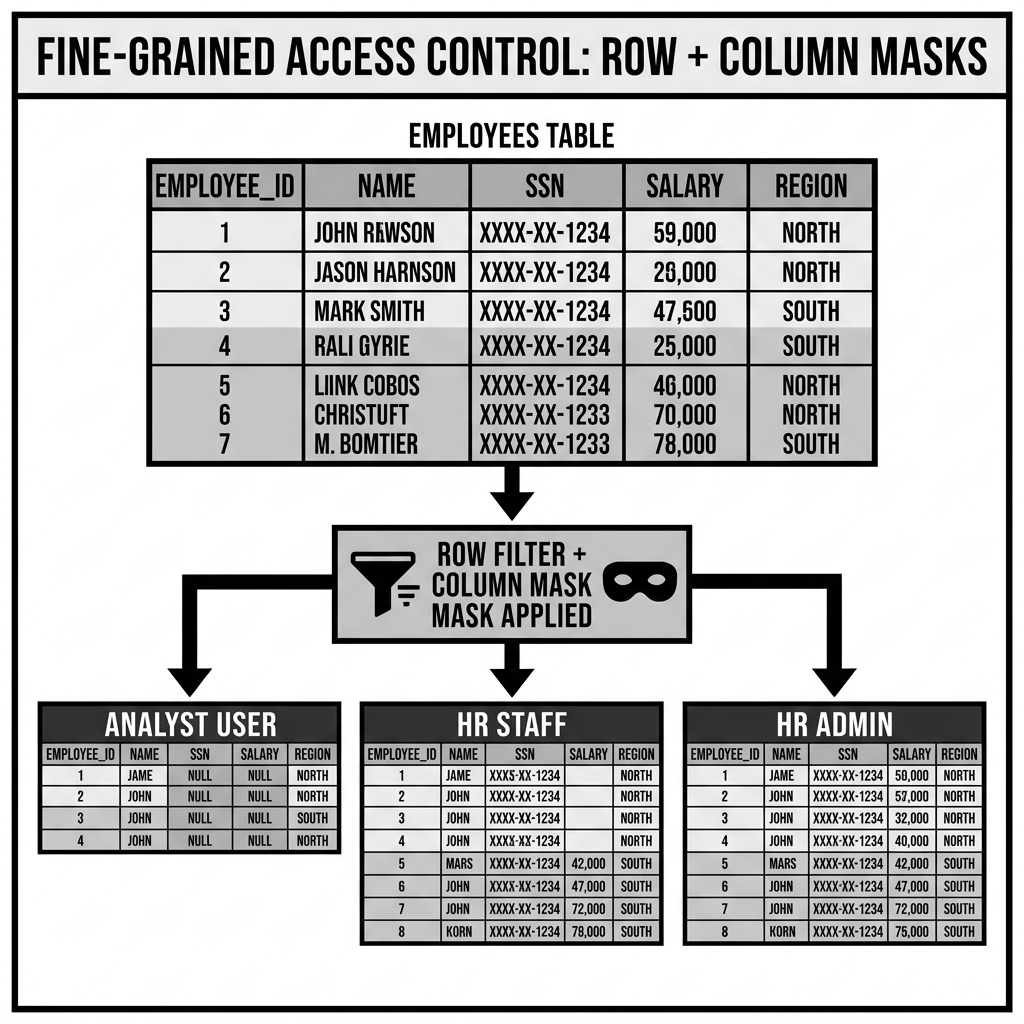
A data analyst querying SELECT * FROM hr.employees receives NULL in the social_security_number column. HR staff see the last four digits (partially masked). HR administrators see the full SSN.
Column masking is particularly important for GDPR and CCPA compliance, where columns containing personal data (name, email, phone, address, SSN, credit card number) must be protected from broad access.
3. Cell-Level Security
Cell-level security is the combination of row-level security and column masking applied simultaneously, producing different data views for different users even when they query the same table:
- User A (APAC analyst, no PII authorization): Sees only APAC region rows, with SSN as NULL.
- User B (global finance, PII authorized): Sees all rows, with SSN as NULL.
- User C (global HR admin): Sees all rows, with full SSN visible.
- User D (APAC HR admin): Sees only APAC rows, with full SSN visible.
Cell-level security is what truly differentiates FGAC from coarser access models: the same SQL query produces completely different result sets for different users, governed by the combination of their row filter and column mask policies.
4. Dynamic Data Masking (DDM)
Dynamic Data Masking is a broader form of column masking that applies transformations beyond simple redaction. DDM functions can:
Pseudonymization: Replace PII values with consistent, deterministic pseudonyms (the same user ID always maps to the same pseudonym within a session), enabling analytics on de-identified data while preserving join-ability across tables:
CREATE FUNCTION governance.masks.pseudonymize_user_id(user_id BIGINT)
  RETURN CASE
    WHEN is_member('pii_authorized') THEN user_id
    ELSE HASH(user_id || session_secret())
END;Tokenization: Replace sensitive values (credit card numbers, account numbers) with random tokens that are meaningless without the tokenization key:
Format-preserving masking: Replace values with syntactically valid but fictitious values of the same format (a masked SSN still looks like an SSN: 123-45-6789 becomes 987-65-4320). This enables testing and development with realistic data shapes without real PII exposure.
Partial masking: Show a meaningful portion of the value (first/last characters) while obscuring the rest: j*****@example.com from john@example.com.
FGAC in Lakehouse Catalog Implementations
Unity Catalog: Row Filters and Column Masks
Unity Catalog provides native row filter and column mask capabilities, as described above. Key implementation details:
SQL function-based policies: Both row filters and column masks are defined as Unity Catalog SQL functions and then attached to tables. This allows complex, parameterized policies that reference other governance tables (user-attribute lookup tables, policy configuration tables).
Policy inheritance: Row filters attached at the table level apply to all queries against that table, including queries against views built on the table. A view CREATE VIEW finance_summary AS SELECT ... FROM hr.employees inherits the employees table’s row filters and column masks — there is no way for view authors to bypass the underlying FGAC policies.
Performance: Row filter and column mask evaluation adds overhead to every query against a protected table. Unity Catalog’s implementation evaluates filters using Photon (Databricks’ native vectorized execution engine) to minimize this overhead, but complex filters (especially those requiring sub-queries against lookup tables) can have meaningful query-time impact.
Apache Polaris: Current State and Roadmap
Polaris’s primary FGAC capability as of early 2026 is column-level access control: RBAC grants can be restricted to specific columns within a table, preventing unauthorized users from reading sensitive columns. When a user without TABLE_READ_DATA for a specific column queries the table, that column is returned as NULL.
Full row filter and dynamic column masking support (equivalent to Unity Catalog’s row filter functions and column masks) is on Polaris’s roadmap but had not reached production availability as of the knowledge cutoff. Organizations requiring row-level security with Polaris catalogs typically implement it at the query engine level (through Dremio’s semantic layer or Trino’s table functions) rather than natively in the catalog.
AWS Lake Formation: Column-Level Permissions and Row Filters
Lake Formation’s FGAC provides:
Column-level permissions: GRANT SELECT ON COLUMNS (col1, col2) ON TABLE t TO ROLE r limits read access to specific named columns. Users without column permissions see those columns as excluded from their result set.
Row-level security via Data Filters: Lake Formation Data Filters are SQL WHERE clause conditions attached to (table, IAM role) pairs:
GRANT SELECT ON TABLE orders
  WITH ROW FILTER EXPRESSION "sale_region = '${user:department}'"
  TO ROLE regional_analysts;
The ${user:department} placeholder is replaced at query time with the department attribute from the IAM principal’s session context (from AWS IAM attributes or Lake Formation tags). This implements dynamic, attribute-driven row-level security.
Lake Formation Data Filters are enforced by Lake Formation’s credential vending system: when generating storage credentials for a query, Lake Formation scopes the credentials to a session policy that includes the relevant row filter pushdown conditions.
Trino: Connector-Level Access Control
Trino implements FGAC through its pluggable SystemAccessControl interface, which can be configured to apply row filters and column masks through policy plugins. The OpaAccessControl plugin delegates access decisions to Open Policy Agent, which can return not just ALLOW/DENY decisions but also row filter SQL expressions and column masking SQL expressions to inject into the query plan.
The Performance Cost of FGAC
FGAC mechanisms impose query-time overhead that must be understood and managed:
Row filter overhead: A row filter that requires a sub-query against a user-attribute lookup table adds a join to every query against the protected table. For tables with millions of rows, the filter predicate is pushed into the scan (it may enable predicate pushdown for simple conditions like region = 'APAC'), but complex conditions requiring joins cannot be pushed to the storage layer and must be applied after data retrieval.
Column masking overhead: Simple masking functions (regex replace, NULL substitution) add minimal overhead. Complex masking functions (pseudonymization with HMAC, tokenization with external vault lookup) can add significant per-row CPU cost.
Policy evaluation caching: Frequently accessed governance lookup tables (user-attribute tables, policy configuration tables) should be cached in the query engine’s memory to avoid repeated storage reads for every query. Unity Catalog caches policy evaluation results; Polaris and Lake Formation also implement caching at the catalog layer.
FGAC and the Semantic Layer
In platforms with a semantic layer (Dremio, Looker, dbt semantic layer), FGAC can be implemented at the semantic layer as an alternative to catalog-native row filters and column masks. The semantic layer’s virtual dataset definitions embed the access conditions directly in the view SQL:
-- Dremio semantic layer virtual dataset with embedded FGAC
CREATE VIEW finance.orders_by_region AS
SELECT *
FROM raw.orders
WHERE sale_region = CURRENT_USER_ATTRIBUTE('home_region')
  AND order_date >= DATEADD(MONTH, -12, CURRENT_DATE());
Implementing FGAC at the semantic layer provides more flexibility (the full expressiveness of SQL) but weaker enforcement (applies only through the semantic layer, not when tables are accessed directly through the catalog). Catalog-native FGAC (Unity Catalog row filters, Lake Formation data filters) enforces at the catalog layer and applies to all access paths — making it the stronger security boundary for regulated environments.
Conclusion
Fine-Grained Access Control is the governance layer that makes data sharing safe in environments where the same physical tables contain data of varying sensitivity, belonging to multiple tenants, or subject to regulatory restrictions on personal data access. Its four mechanisms — row-level security, column masking, cell-level security, and dynamic data masking — transform table-level RBAC from a binary “can access the table” decision into a continuous, parameterized “which portion of the table can this user see in this context” decision. The implementations in Unity Catalog (SQL-function-based row filters and column masks), Lake Formation (Data Filters), and Polaris (column-level grants) bring FGAC to the catalog layer where it applies uniformly across all query engines. For organizations governed by GDPR, CCPA, HIPAA, or PCI-DSS — or for any multi-tenant lakehouse where the same physical table serves multiple audiences with different data visibility requirements — FGAC is a non-negotiable architectural requirement.
Visual Architecture