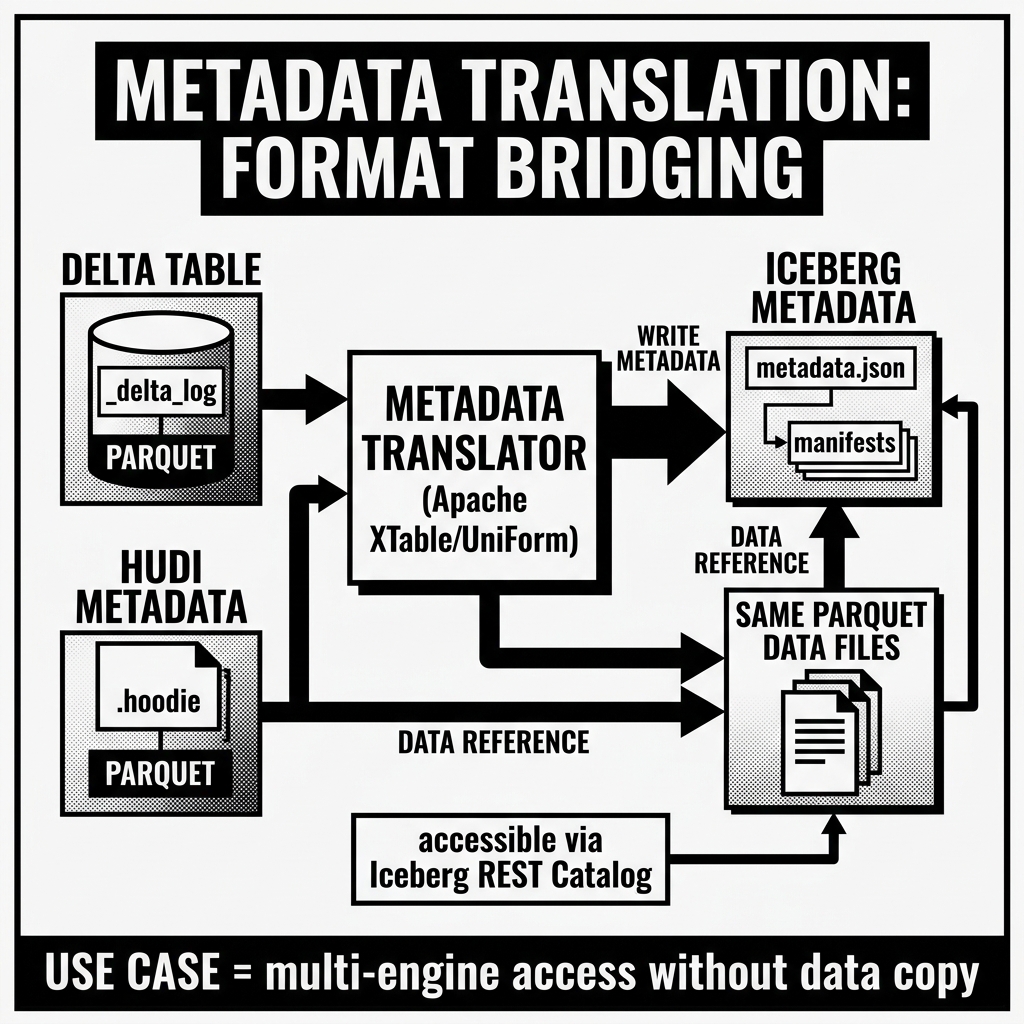
Metadata Translation
Metadata Translation is the technical process of reading the metadata representation of a data table in one Open Table Format and generating an equivalent, semantically accurate metadata representation in a different Open Table Format, without modifying or duplicating the underlying physical data files. It is the foundational engineering mechanism that makes cross-format interoperability possible in the modern data lakehouse.
To understand metadata translation deeply, you must understand precisely what is being translated: not data, not schemas in the abstract, and not files in the abstract — but the specific, format-native metadata structures that each Open Table Format uses to represent the table’s current state, its history, its file layout, and its physical data statistics. The translation is not a simple format conversion. It is a complex, stateful, multi-dimensional mapping problem that requires handling schema evolution, partition layout differences, statistical representation gaps, and snapshot lifecycle management across fundamentally incompatible metadata systems.
The Metadata Being Translated: A Precise Inventory
To translate metadata faithfully, you must first enumerate exactly what metadata an Open Table Format maintains for a table. The set of metadata dimensions that must be translated is consistent across formats, even though the specific encoding differs dramatically:
1. Schema Representation
Every table format maintains a complete, versioned schema — the set of column names, their data types, their nullability, their nesting structure (for complex types like STRUCT, ARRAY, MAP), and the history of how the schema has changed over time.
Iceberg represents the schema as a JSON document with a recursive field definition, where every field carries a unique, immutable integer column ID. This ID is the stable anchor that allows Iceberg to track a column through renames, preventing any ambiguity about which physical data bytes correspond to which logical column name.
Delta Lake represents the schema as a JSON document using StructType notation, where fields are identified by their name and positional order. Delta does not assign persistent integer IDs to columns in the same fundamental way Iceberg does — the stability of schema evolution in Delta is achieved through the transaction log’s sequential application of schema change actions.
Hudi represents the schema using the Avro Schema specification, stored directly in the Timeline commit metadata and in the Hudi Metadata Table. Avro schemas support recursive nesting and explicit field aliases (for rename tracking), but the mechanism differs from both Iceberg’s column IDs and Delta’s transaction log approach.
When translating schema from Delta to Iceberg (as XTable does), the translator must construct synthetic, stable Iceberg column IDs for every Delta field. The translation must ensure that the same Delta field consistently maps to the same Iceberg column ID across multiple translation runs, even as the schema evolves. If a translation run assigns column ID 7 to field customer_region, then two translation runs later (after another unrelated column was added), field customer_region must still carry column ID 7. Any deviation breaks Iceberg’s schema evolution guarantees.
2. Partition Layout
Every table format tracks how data is partitioned across the object storage layer, but with very different levels of abstraction:
Iceberg’s Partition Spec is a logical transformation specification. It defines partitioning in terms of transform functions applied to source columns (e.g., month(event_timestamp) or bucket(16, customer_id)). The physical partition values are computed by Iceberg from the raw data, not from redundant partition columns. The Partition Spec also maintains a history (multiple versioned specs), allowing different data files to be partitioned differently within the same table.
Delta Lake’s partition specification is a flat list of column names. Partition values are explicitly present in the data (as partition columns) and encoded in the file paths using Hive-style directory naming (year=2026/month=05/). Delta does not support transform functions or partition evolution in the Iceberg sense.
Hudi’s partitioning is also file-path-based (Hive-style), with the partition columns and values appearing in the directory structure. Hudi supports multiple partitioning keys but does not support logical transform functions.
When translating partition metadata from a Hudi or Delta source to an Iceberg target, the translator must:
- Identify the partition column names from the source format.
- Map them to identity transforms in the generated Iceberg Partition Spec (since the partition values are already materialized as physical column values, not derived from transforms).
- Correctly encode the partition values into the Iceberg Manifest File’s
partitionfield for each data file.
Critically, if the source table uses Partition Evolution — different historical data files written under different partition schemes — the Iceberg target must represent this using multiple Partition Spec versions, one per historical partitioning scheme. Failing to do this correctly will cause Iceberg query engines to apply incorrect partition pruning, returning wrong results.
3. File Statistics
The primary purpose of metadata in all three formats is to enable query engines to skip irrelevant data files without reading them. This file skipping capability depends entirely on accurate per-file statistics, specifically:
Row count: The total number of rows in each data file.
File size: The physical size of each data file in bytes.
Column-level min/max values: For each column in each data file, the minimum and maximum values present. A query filter WHERE region = 'EU' can use these statistics to skip any file whose region max value is less than ‘EU’ or whose min value is greater than ‘EU’.
Null value counts: For each column, the number of null values. This allows the query engine to prune files that could not possibly satisfy WHERE column IS NOT NULL.
Value counts: The total number of values (null + non-null) in each column, used for cardinality estimation during query planning.
In Delta Lake, all of these statistics are stored as JSON inside each add action in the _delta_log/. They are embedded per-file during the write and immediately available to any reader that parses the transaction log.
In Apache Iceberg, statistics are stored in the Manifest Files (Avro format), one entry per data file. The statistics live in a well-defined structure within the Manifest File, and the Manifest List additionally stores summary-level statistics (min/max across all files in a manifest) for rapid manifest-level pruning.
In Apache Hudi, statistics are stored in the internal Hudi Metadata Table, in a dedicated column statistics index partition. The query engine reads the Metadata Table to obtain statistics for each file, rather than parsing them from individual manifest or log entries.
When XTable translates file statistics from Delta to Iceberg, it reads the per-file statistics from each add action JSON in the Delta transaction log and writes them into the corresponding entries in the generated Iceberg Manifest Files. The statistics themselves — the actual min/max values and null counts — are identical in both representations. Only the encoding format and storage location differ.
A critical failure mode here is statistics precision loss. If the Delta source has statistics for 50 columns, but the Iceberg Manifest File format imposes a practical limit on the number of columns with embedded statistics (due to file size constraints), the translator must make a principled decision about which columns’ statistics to include. Dropping statistics for high-selectivity filter columns will result in the Iceberg query engine being unable to skip files effectively, degrading query performance compared to native Delta reads.
4. Snapshot and Version History
Every Open Table Format maintains a versioned history of the table’s state over time. The mechanism differs:
In Iceberg, this history is a linked chain of metadata JSON files, each containing a Snapshot entry that points to the Manifest List for that version’s file set. The metadata.json contains the snapshots array with all historical snapshot entries (up to a configurable retention limit).
In Delta Lake, the history is the ordered sequence of JSON commit files in the _delta_log/, each representing one transaction. Checkpoints provide efficient access to bulk state, while the log entries provide the individual delta of each commit.
In Hudi, the history is the Timeline of Instants in the .hoodie/ directory, with each Instant representing a completed action (commit, compaction, clean).
When XTable generates Iceberg metadata from a Delta or Hudi source, it must create Iceberg Snapshot entries that correspond to the source format’s commits. There is not always a perfect one-to-one correspondence: as described in the XTable article, batching can cause multiple Delta commits to be represented by a single Iceberg snapshot. The translator must determine the appropriate commit batching granularity and generate Iceberg Snapshot entries that accurately represent the table’s state at those batching boundaries.
For Time Travel to work correctly through the translated Iceberg metadata, the Iceberg snapshot timestamps must accurately reflect the original commit timestamps from the source format. An Iceberg VERSION AS OF '2026-05-01 12:00:00' query will navigate to the Iceberg snapshot whose timestamp is closest to (but not after) that datetime. If XTable generated the Iceberg snapshot at 14:00:00 for a Delta commit that occurred at 11:55:00, the Time Travel query will correctly find the data from the Delta commit, because the Iceberg snapshot timestamp is derived from the Delta commit’s commitInfo.timestamp.
5. Metadata Lifecycle Management
As new commits are made to the source table, new translated metadata must be generated for the target format, and old metadata must be appropriately retired to prevent unbounded growth of the metadata directory.
For Iceberg target metadata, this means periodically running Iceberg’s ExpireSnapshots operation against the translated Iceberg table to remove old snapshot entries and their associated manifest files, applying the same retention policy as the source format.
For Delta Lake target metadata, old transaction log entries must be retained for the same period as the source format’s retention window, allowing Delta readers to perform Time Travel queries against the translated Delta table within the same historical bounds as the source.
Failing to manage metadata lifecycle correctly produces two distinct failure modes: if metadata is retired too aggressively, Time Travel queries will fail for historical timestamps that should be accessible based on the retention policy. If metadata is never retired, the metadata directories grow without bound, eventually slowing down query planning as engines must parse larger and larger metadata structures.
The Incremental vs. Full Sync Decision
Every metadata translation tool (XTable, UniForm, or custom implementations) must make a fundamental architectural decision on every synchronization cycle: perform an incremental sync (processing only commits that occurred since the last successful sync) or a full sync (rebuilding the target metadata from the complete current state of the source).
Incremental Sync
An incremental sync is the efficient steady-state operation. The translator reads the source format’s commit log starting from the watermark of the last successful sync, extracts the delta of files added and files removed in each new commit, and updates the target format’s metadata incrementally. For a Delta table receiving 100 new commits since the last sync, an incremental sync reads only the metadata of those 100 commits — typically a few kilobytes of JSON — and generates the corresponding delta in the target Iceberg metadata.
Incremental syncs are fast, cheap, and scalable. They are the correct operational mode for production pipelines.
Full Sync
A full sync rebuilds the target metadata from scratch by reading the complete current state of the source table — the full list of all active files, with all their statistics — and regenerating the complete target metadata from the ground up. Full syncs are expensive because they must enumerate every active file in the table (potentially millions of files) and generate a fresh set of target manifest files from that enumeration.
Full syncs are necessary in several circumstances:
- Initial bootstrap of a new XTable configuration.
- Recovery after a detected inconsistency between source and target metadata.
- After a source-side operation that breaks incremental sync continuity (e.g., if the Hudi timeline’s archived section has been cleaned and the incremental watermark is now in the archived region that XTable can no longer access).
Production XTable deployments typically run incremental syncs on every cycle (every few minutes) and schedule full syncs on a much longer cadence (weekly or monthly) as a reliability backstop.
Metadata Translation in Practice: Operational Patterns
The most common production deployment pattern for metadata translation is a dedicated synchronization job running on a scheduled or event-driven basis. This job:
- Reads the source table’s metadata to identify new commits since the last sync watermark.
- For each new commit, extracts file additions, file removals, schema changes, and partition spec changes.
- Generates the corresponding target format metadata artifacts.
- Writes the target format metadata to object storage.
- Updates the sync watermark to the latest processed commit.
- Optionally registers or updates the table in the target format’s catalog.
This job is typically deployed as a Spark batch application (for large-scale table syncs), a lightweight Python script (for smaller tables or catalog-only syncs), or a managed service (where cloud providers or lakehouse vendors offer managed XTable synchronization as a first-party feature).
Conclusion
Metadata Translation is the engineering mechanism that bridges the inherent incompatibility between Open Table Format metadata systems. Its correctness depends on faithful translation across five distinct metadata dimensions: schema representation (with stable column ID assignment), partition layout (with support for partition evolution), file statistics (with full precision), snapshot history (with accurate timestamp alignment), and metadata lifecycle management. Tools like Apache XTable implement this translation with remarkable depth, but the operational constraints — incremental sync latency, full sync cost, type system edge cases, and statistics precision — demand careful architectural planning in any production deployment. Metadata Translation is not a trivial compatibility shim; it is a sophisticated distributed systems engineering problem whose solution directly determines the reliability, performance, and correctness of every cross-format lakehouse interaction.
Visual Architecture