Table Maintenance
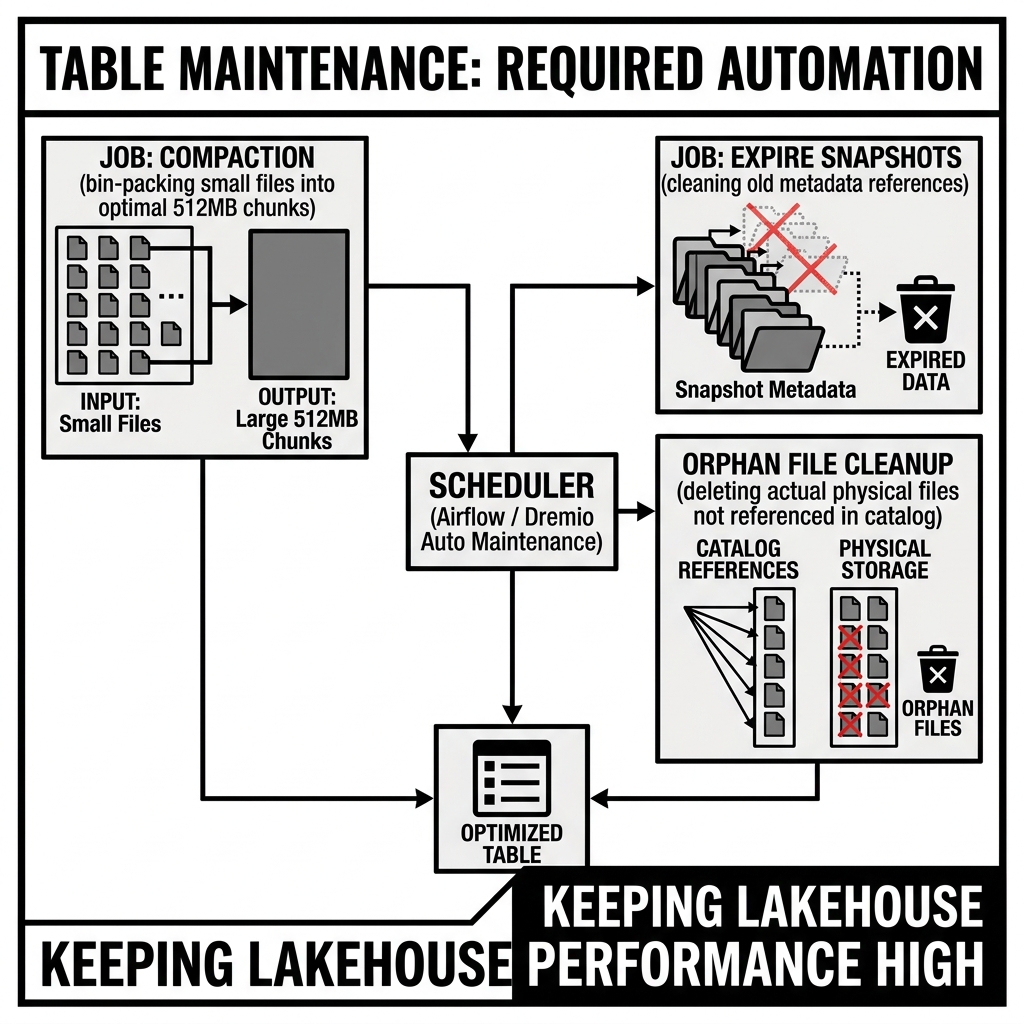
Table Maintenance is the collection of recurring operational procedures that keep Apache Iceberg tables performant, storage-efficient, and operationally healthy over time. Unlike traditional data warehouses where the engine manages table internals automatically, the open lakehouse’s separation of storage and compute means that maintenance operations — compaction, snapshot expiry, orphan file cleanup, manifest optimization, and statistics collection — must be explicitly performed, either by scheduled jobs or by managed maintenance services.
Understanding table maintenance is not optional knowledge for lakehouse operators: an Iceberg table that never receives maintenance will predictably degrade. Query performance degrades as small file accumulation forces engines to open thousands of tiny files instead of hundreds of optimally sized ones. Storage costs escalate as expired snapshot data and orphan files accumulate. Metadata read overhead increases as the Manifest File count grows with each commit. Table maintenance is the operational discipline that prevents this degradation.
The Four Core Maintenance Operations
1. Compaction (Data File Optimization)
Compaction is the process of merging small data files into fewer, larger, optimally-sized files. It is the most impactful maintenance operation for query performance and the one that must be performed most frequently for actively written tables.
Why compaction is needed: Every Iceberg write operation (INSERT, streaming micro-batch, streaming mini-batch) produces new Parquet data files. Streaming pipelines that commit every 30 seconds produce 2 files per minute, 120 files per hour, 2,880 files per day — all before any data growth, just from write frequency. A table receiving streaming writes without compaction for a week will have over 20,000 small files instead of the handful of large files that the same data could be stored in.
Small files harm performance in two ways:
- File open overhead: Each Parquet file requires a metadata read (the Parquet footer), a file open operation against object storage, and a TCP connection establishment. For 20,000 small files, this overhead dwarfs the actual data read time.
- Ineffective file skipping: Small files contain fewer rows, so their min-max statistics cover smaller ranges and overlap more with each other. Queries that should skip 90% of the data end up reading 50% because the per-file statistics aren’t selective enough to prune small files.
The optimal file size: The target file size for compaction is typically 128MB–512MB. Smaller than 128MB and you have too many files; larger than 512MB and you lose granularity (a single large file scan is less parallelizable than multiple medium files).
Compaction in practice: Apache Iceberg provides the rewriteDataFiles action (via the Iceberg Spark Actions API):
from pyspark.sql import SparkSession
from pyiceberg.catalog import load_catalog

# Using Iceberg Spark Actions
spark.sql("""
  CALL analytics.system.rewrite_data_files(
    table => 'analytics.orders',
    options => map('target-file-size-bytes', '268435456')  -- 256MB
  )
""")
This rewrites the data files for the orders table, producing output files of approximately 256MB. The operation is non-destructive — the old files remain referenced by older snapshots until those snapshots are expired, preserving time-travel capability.
Compaction modes:
- Bin-packing: Groups files into bins that together approach the target file size, minimizing the number of output files without sorting. Fast but doesn’t improve data ordering.
- Sort: During compaction, sorts the data by specified columns (or by Hilbert curve ordering of multiple columns), improving data skipping effectiveness for future queries. Slower than bin-packing but produces better-clustered files.
- Z-Order / Hilbert clustering: A special case of sort compaction that uses space-filling curve ordering of multiple columns simultaneously.
2. Snapshot Expiry
Iceberg’s snapshot model is fundamentally immutable: every write produces a new snapshot that references the full current set of data files, while the old snapshot is retained in the snapshot history chain. Without expiry, every version of every data file written to the table is retained indefinitely — a major storage cost for tables with frequent writes.
Snapshot expiry removes old snapshot entries from the table metadata and marks the data files that were exclusively referenced by those expired snapshots as candidates for deletion. Expiry does NOT immediately delete the data files — that requires a separate orphan file cleanup step.
Configuration parameters:
min-snapshots-to-keep: The minimum number of recent snapshots to retain regardless of age (default: 1). Setting this to 5–10 ensures that the most recent few snapshots are always available for time travel and recovery.max-snapshot-age-ms: Snapshots older than this age are expired. Common values: 7 days (604,800,000 ms) or 30 days (2,592,000,000 ms). The appropriate window depends on how long you need time travel capability and how frequently data is written.
-- Iceberg SQL procedure (Spark)
CALL analytics.system.expire_snapshots(
  table => 'analytics.orders',
  older_than => TIMESTAMP '2026-05-11 00:00:00',
  retain_last => 5
);
When NOT to expire snapshots: If the table has active branches (in Nessie/Arctic), snapshots referenced by branch tips should not be expired — they are still in active use. Nessie-managed snapshot expiry is branch-aware and avoids expiring snapshots referenced by any active branch.
3. Orphan File Cleanup
Orphan files are data files, Manifest Files, Manifest Lists, and metadata JSON files on object storage that are not referenced by any current or historical Iceberg snapshot. They are left behind by:
- Failed or interrupted write operations (the engine wrote data files but crashed before committing the snapshot).
- Aborted transactions (the engine rolled back a transaction but the written files were not cleaned up).
- External tools that wrote files to the table’s storage prefix without using the Iceberg write protocol.
Orphan file cleanup compares the complete list of files in the table’s storage prefix (an S3 LIST operation) against the files referenced by all active snapshots in the table’s metadata. Files that appear in the S3 listing but not in the metadata are orphans and are deleted.
CALL analytics.system.remove_orphan_files(
  table => 'analytics.orders',
  older_than => TIMESTAMP '2026-05-11 00:00:00'
);
The older_than parameter is critical for safety: orphan file cleanup should only delete files older than the maximum time between a file being written and the corresponding snapshot being committed. A file that was written 30 minutes ago for an in-progress transaction that hasn’t committed yet should not be deleted. Setting older_than to 24–48 hours before the current time provides a safe buffer.
4. Manifest File Compaction
Each Iceberg snapshot adds a new Manifest File to the table’s metadata. After thousands of commits (from streaming ingestion, frequent small batch writes), the Manifest List may contain thousands of small Manifest Files, each covering only a few data files. Reading all of these Manifest Files for query planning adds significant I/O overhead.
Manifest compaction rewrites many small Manifests into fewer, larger Manifests:
CALL analytics.system.rewrite_manifests('analytics.orders');Manifest compaction is typically needed less frequently than data file compaction (monthly rather than daily for most workloads) but can significantly reduce query planning time for tables that have accumulated many small Manifest Files from streaming writes.
Statistics Collection
Column statistics — used by the query optimizer for join order selection, filter cardinality estimation, and pushdown decisions — must be explicitly collected in Iceberg. Unlike traditional databases that compute statistics automatically, Iceberg relies on either:
Parquet footer statistics: Automatically written by all Iceberg-compatible Parquet writers. Per-row-group min, max, null count, and row count are always present for all column types.
Puffin file statistics: Extended statistics (NDV via Theta Sketches, histograms) stored in Puffin files alongside the data. These are not generated automatically and require explicit ANALYZE TABLE calls:
ANALYZE TABLE analytics.orders COMPUTE STATISTICS FOR ALL COLUMNS;Or for specific columns where they have the highest optimizer impact:
ANALYZE TABLE analytics.orders COMPUTE STATISTICS FOR COLUMNS customer_id, product_id, order_date;Statistics should be refreshed after compaction (which rewrites files and potentially changes column value distributions) and after large data loads that significantly change the table’s data distribution.
Maintenance Scheduling Strategies
Frequency by Write Pattern
| Write Pattern | Compaction Frequency | Snapshot Expiry | Orphan Cleanup |
|---|---|---|---|
| Streaming (< 1 min micro-batches) | Multiple times daily | Daily | Weekly |
| Near-real-time (5–15 min batches) | Daily | Daily | Weekly |
| Hourly batches | Every 2–3 days | Weekly | Bi-weekly |
| Daily batches | Weekly | Weekly | Monthly |
| Weekly batches | Monthly | Monthly | Quarterly |
Apache Spark: Dedicated Maintenance Jobs
For self-managed Iceberg deployments, maintenance operations run as dedicated Spark jobs in the orchestration pipeline:
# maintenance_job.py
from pyspark.sql import SparkSession

spark = SparkSession.builder \
  .appName("IcebergTableMaintenance") \
  .getOrCreate()

tables = [
  "analytics.orders",
  "analytics.customers",
  "analytics.events",
]

for table in tables:
  # Compaction with sort
  spark.sql(f"""
    CALL catalog.system.rewrite_data_files(
      table => '{table}',
      strategy => 'sort',
      sort_order => 'hilbert_sort_order',
      options => map('target-file-size-bytes', '268435456')
    )
  """)

  # Expire old snapshots
  spark.sql(f"""
    CALL catalog.system.expire_snapshots(
      table => '{table}',
      older_than => TIMESTAMP '{seven_days_ago}',
      retain_last => 5
    )
  """)

  # Remove orphan files
  spark.sql(f"""
    CALL catalog.system.remove_orphan_files(
      table => '{table}',
      older_than => TIMESTAMP '{two_days_ago}'
    )
  """)

spark.stop()
This job is typically orchestrated by Apache Airflow, Dagster, or Prefect on a daily or weekly schedule, depending on the table’s write frequency.
Automated Maintenance in Managed Services
The operational overhead of self-managing table maintenance is one of the primary reasons organizations adopt managed lakehouse catalog services:
Dremio: Provides automated background optimization for all Iceberg tables managed in Dremio’s catalog — compaction, snapshot expiry, and orphan file cleanup run automatically with no user configuration required.
AWS Glue Managed Iceberg Optimization: Glue’s table optimizer (configured per table) provides automated compaction, snapshot expiry, and orphan file cleanup. The optimizer monitors file size distributions and triggers maintenance automatically.
Databricks (Unity Catalog with Photon): Databricks provides automatic liquid clustering maintenance for Delta tables with liquid clustering enabled, and automated compaction for Iceberg tables managed in Unity Catalog.
Tabular (pre-acquisition): Provided fully automated maintenance as a core product capability.
The managed maintenance model is preferred for most organizations because it eliminates the operational complexity of scheduling, monitoring, and tuning maintenance jobs — at the cost of some flexibility in configuring maintenance timing and parameters.
Monitoring Maintenance Health
Key metrics to monitor for table maintenance health:
Average file size: Should be between 100MB and 512MB for most workloads. If consistently below 50MB, compaction is not running frequently enough. If consistently above 1GB, files may be too large for efficient parallel scan.
Number of data files: Should be proportional to the table’s data volume at the target file size. A 1TB table at 256MB target size should have ~4,000 files. Significantly more files indicates compaction lag.
Snapshot count: Should reflect the retention policy. If the table has thousands of snapshots when the retention policy should keep only 30, snapshot expiry is not running.
Manifest file count: Should be approximately total data files / average manifest file entry count. Manifests with fewer than 100 entries indicate manifest compaction is needed.
Orphan file storage footprint: Storage consumed by orphan files (tracked as total storage minus the storage referenced by active snapshots) should be minimal — a large orphan footprint indicates orphan file cleanup is not running.
Conclusion
Table maintenance is the operational discipline that determines whether an Iceberg lakehouse remains a high-performance, cost-efficient analytical platform over time — or degrades into a system of thousands of tiny files, expired-but-never-removed snapshots, and orphan file accumulation. The four core maintenance operations (compaction, snapshot expiry, orphan file cleanup, manifest compaction) plus statistics collection define the complete operational hygiene checklist for every Iceberg table. Engineers designing lakehouse data pipelines must include maintenance as a first-class architectural concern: deciding at design time how frequently each operation must run, which managed service or scheduled job will execute it, and which metrics will signal when maintenance is falling behind. The managed lakehouse services (Dremio, Glue Optimizer, Unity Catalog) that automate this maintenance are among the most valuable operational improvements the lakehouse ecosystem has made, freeing data engineering teams from infrastructure management to focus on the data transformations and quality governance that actually differentiate their platforms.
Visual Architecture