Using Apache Iceberg with Python and MPP Query Engines
Read the complete Apache Iceberg Masterclass series:
- Part 1: What Are Table Formats and Why Were They Needed?
- Part 2: The Metadata Structure of Modern Table Formats
- Part 3: Performance and Apache Iceberg’s Metadata
- Part 4: Partition Evolution: Change Your Partitioning Without Rewriting Data
- Part 5: Hidden Partitioning: How Iceberg Eliminates Accidental Full Table Scans
- Part 6: Writing to an Apache Iceberg Table: How Commits and ACID Actually Work
- Part 7: What Are Lakehouse Catalogs? The Role of Catalogs in Apache Iceberg
- Part 8: When Catalogs Are Embedded in Storage
- Part 9: How Data Lake Table Storage Degrades Over Time
- Part 10: Maintaining Apache Iceberg Tables: Compaction, Expiry, and Cleanup
- Part 11: Apache Iceberg Metadata Tables: Querying the Internals
- Part 12: Using Apache Iceberg with Python and MPP Query Engines
- Part 13: Approaches to Streaming Data into Apache Iceberg Tables
- Part 14: Hands-On with Apache Iceberg Using Dremio Cloud
- Part 15: Migrating to Apache Iceberg: Strategies for Every Source System This is Part 12 of a 15-part Apache Iceberg Masterclass. Part 11 covered metadata tables. This article covers the two main ways to access Iceberg data: directly from Python libraries and through MPP (massively parallel processing) query engines.
The Python Ecosystem for Iceberg
PyIceberg: Native Python Access
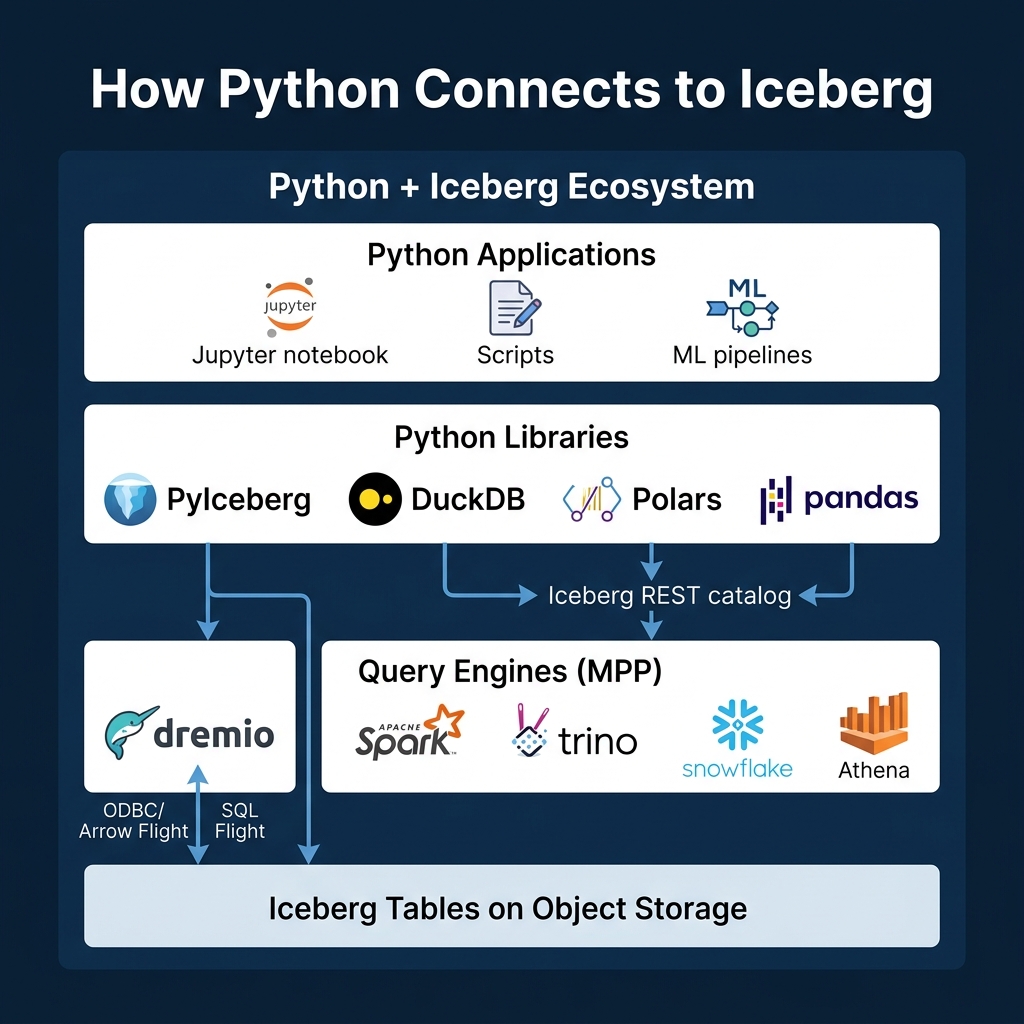
PyIceberg is the official Python library for Apache Iceberg. It reads Iceberg metadata directly and can scan data files without an external query engine.
from pyiceberg.catalog import load_catalog

# Connect to a REST catalog
catalog = load_catalog("my_catalog", **{
    "type": "rest",
    "uri": "https://catalog.example.com",
})

# Load and scan a table
table = catalog.load_table("analytics.orders")
scan = table.scan(row_filter="amount > 100")
df = scan.to_pandas()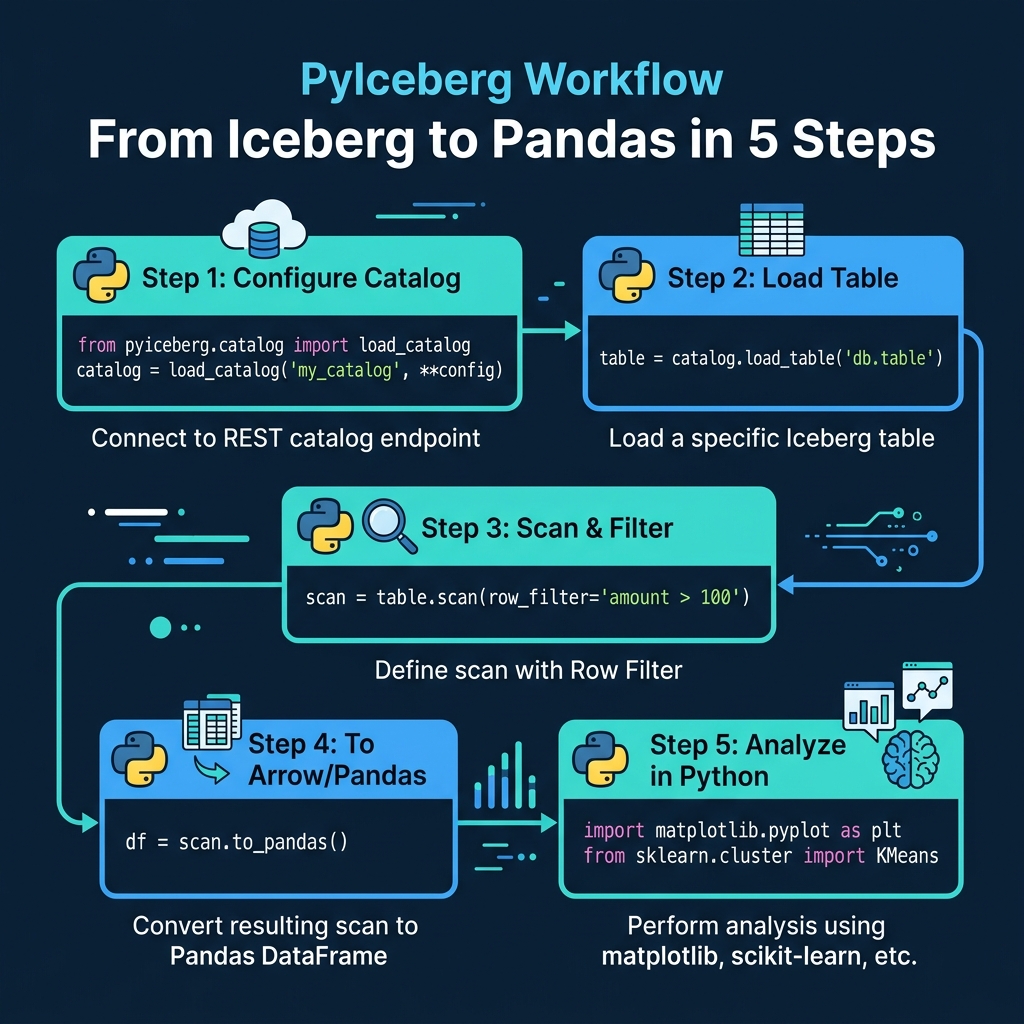
PyIceberg leverages Iceberg’s metadata-driven pruning: the row_filter is pushed down to manifest evaluation, so only relevant data files are read. For reading subsets of large tables into Python for analysis or ML training, this is remarkably efficient.
PyIceberg also supports writes (appending data from Arrow tables), schema evolution, and table management operations. It connects to any catalog that implements the REST protocol, including Dremio Open Catalog.
DuckDB: SQL-Based Python Analysis
DuckDB can read Iceberg tables through its Iceberg extension:
import duckdb

conn = duckdb.connect()
conn.execute("INSTALL iceberg; LOAD iceberg;")

df = conn.execute("""
    SELECT customer_id, SUM(amount) as total
    FROM iceberg_scan('s3://warehouse/orders')
    GROUP BY customer_id
""").fetchdf()
DuckDB processes the query locally using its columnar execution engine, which is significantly faster than pandas for analytical queries. It supports Iceberg’s partition pruning and column statistics for file skipping. DuckDB runs entirely in-process, so there is no separate server to manage. This makes it a strong choice for local analysis, CI/CD data validation, and notebooks where starting a Spark cluster would be overkill.
DuckDB also supports reading Iceberg metadata tables, which means you can use it for table health diagnostics without standing up a full query engine.
Polars: High-Performance DataFrames
Polars can read Iceberg tables through its scan_iceberg method, providing lazy evaluation and parallel processing:
import polars as pl

df = pl.scan_iceberg("s3://warehouse/orders").filter(
    pl.col("amount") > 100
).collect()
Polars uses a lazy evaluation model: the scan_iceberg call does not read data immediately. Instead, it builds an execution plan. When collect() is called, Polars optimizes the plan (predicate pushdown, column pruning, parallel reads) and executes it. For large Iceberg tables, Polars can scan data several times faster than pandas because it uses all available CPU cores and processes data in Apache Arrow columnar format.
Writing from Python
PyIceberg supports writes through Apache Arrow tables:
import pyarrow as pa

# Create an Arrow table with new data
new_data = pa.table({
    "order_id": [1001, 1002, 1003],
    "amount": [150.00, 275.50, 89.99],
    "order_date": ["2024-03-15", "2024-03-15", "2024-03-16"],
})

# Append to the Iceberg table
table.append(new_data)
This creates a new Iceberg commit with the data files, manifests, and metadata. PyIceberg handles the entire write lifecycle, including partition assignment based on the table’s partition spec.
For bulk writes from Python, using PyIceberg with Arrow is often simpler than setting up Spark. However, PyIceberg runs on a single machine, so it is not suitable for writing terabyte-scale datasets. For that, use an MPP engine.
MPP Query Engines
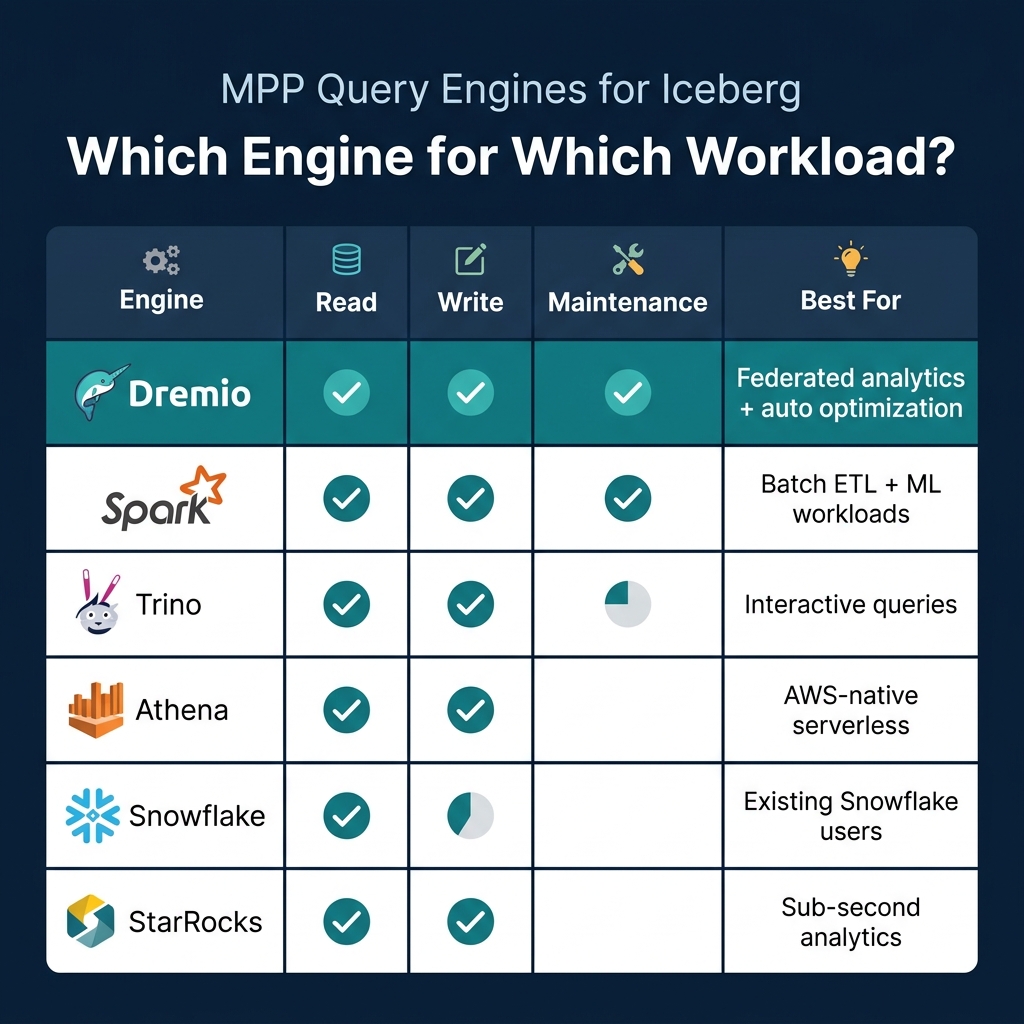
For production workloads at scale, Python libraries running on a single machine are not sufficient. MPP engines distribute query execution across multiple nodes, handling petabyte-scale tables with sub-minute response times.
Dremio
Dremio provides full Iceberg support with several unique capabilities: query federation across Iceberg and non-Iceberg sources, automatic table optimization through Open Catalog, a semantic layer for governed access, and AI-powered analytics through its built-in agent and MCP server.
For Python users, Dremio exposes data through Apache Arrow Flight, which is a high-performance data transfer protocol. Arrow Flight sends data in columnar Arrow format directly to the client, avoiding the serialization overhead of JDBC/ODBC. This makes it 10-100x faster than traditional database connectors for large result sets:
from dremio_simple_query import DremioConnection

conn = DremioConnection("https://your-dremio.cloud", token="...")
df = conn.query("SELECT * FROM analytics.orders WHERE amount > 100")
The result is a pandas DataFrame populated via Arrow Flight. Because the data stays in Arrow format end-to-end (Iceberg Parquet to Dremio to Arrow Flight to pandas), there are no format conversion bottlenecks.
Dremio also provides a Columnar Cloud Cache that stores frequently accessed data on local NVMe drives, making subsequent queries against the same Iceberg data dramatically faster without requiring reflections or materialized views.
Spark
Apache Spark is the most mature Iceberg engine for both reads and writes. It handles batch ETL, streaming ingestion (Part 13), and all maintenance operations. Most Iceberg production pipelines use Spark for data ingestion because of its extensive connector ecosystem (Kafka, JDBC, file formats) and its ability to process large volumes across a distributed cluster.
Spark supports all Iceberg operations: CREATE, INSERT, MERGE, DELETE, UPDATE, schema evolution, partition evolution, and every maintenance procedure (compaction, snapshot expiry, orphan cleanup).
Trino
Trino (formerly PrestoSQL) is optimized for interactive, ad-hoc queries with low latency. It reads and writes Iceberg tables and supports the REST catalog protocol. Trino is popular for exploration and dashboarding workloads where sub-second response times matter and data is being read rather than written. Its architecture keeps no persistent state, making it easy to scale up and down based on query demand.
Other Engines
Several other engines provide Iceberg support: AWS Athena (serverless, AWS-native), Snowflake (read-only for external Iceberg tables), StarRocks (sub-second analytics), and Doris (real-time analytics). The Iceberg community maintains a compatibility matrix showing which engines support which operations.
Choosing the Right Approach
| Scenario | Recommended |
|---|---|
| Quick analysis of a table subset | PyIceberg or DuckDB |
| Production dashboards and reports | Dremio |
| Batch ETL pipelines | Spark |
| Interactive data exploration | Trino or Dremio |
| ML feature extraction | PyIceberg + pandas |
| Multi-source analytics | Dremio federation |
| Serverless AWS queries | Athena |
The key takeaway: Python libraries (PyIceberg, DuckDB, Polars) are best for local analysis and development. MPP engines (Dremio, Spark, Trino) are necessary for production-scale analytics. Many teams use both: PyIceberg for data science experimentation, and Dremio for production dashboards and governed access.
Part 13 covers how to stream data into Iceberg tables.
Books to Go Deeper
- Architecting the Apache Iceberg Lakehouse by Alex Merced (Manning)
- Lakehouses with Apache Iceberg: Agentic Hands-on by Alex Merced
- Constructing Context: Semantics, Agents, and Embeddings by Alex Merced
- Apache Iceberg & Agentic AI: Connecting Structured Data by Alex Merced
- Open Source Lakehouse: Architecting Analytical Systems by Alex Merced